

An SEO audit template is a structured checklist that guides you through reviewing your website’s search performance systematically. It covers technical settings, content quality user experience and backlinks so you can identify what’s blocking your rankings and fix issues methodically.
This guide shows you what an effective SEO audit template includes, how to use it step-by-step and what to check across technical, on-page and off-page SEO. You’ll learn to spot critical issues, prioritize fixes by impact and turn your audit findings into measurable improvements.
Why Do You Need an SEO Audit Template?
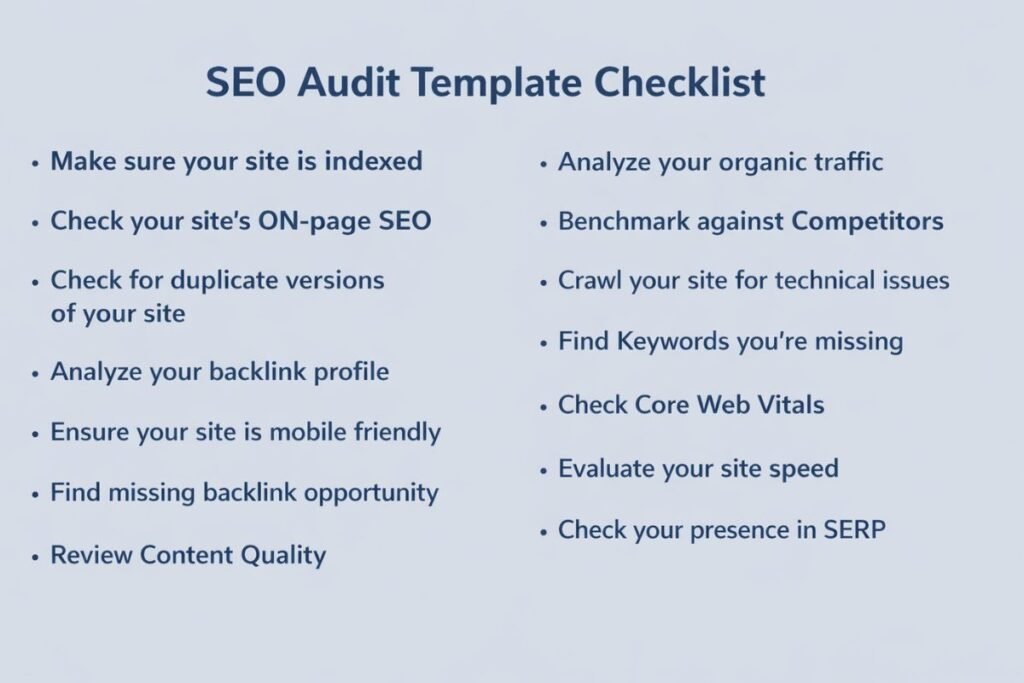
Most websites struggle with rankings not because their content is poor but because hidden technical issues quietly block performance. Pages load slowly, important URLs aren’t indexed, internal links break and low-quality backlinks hurt credibility.
A proper website audit checklist brings these problems into view. It shows which issues are urgent, which are minor and which can wait. When you know exactly what to fix and in what order your SEO work becomes faster and more effective. This leads to better rankings, stronger engagement and more conversions.
What’s Included in an Effective SEO Audit Template?
A complete SEO audit template focuses on three core areas that determine your search visibility.
Technical SEO Checklist
Technical SEO forms the foundation that makes your website work properly. This section checks if search engine bots can crawl your pages without being blocked by robots.txt files, noindex tags or server errors. You review XML sitemap configuration HTTPS security URL structure canonical tags and page speed issues.
Core Web Vitals measure how real users experience your site. Largest Contentful Paint should occur within 2.5 seconds Interaction to Next Paint should stay under 200 milliseconds and Cumulative Layout Shift should remain below 0.1. Poor scores directly impact rankings.
On-Page SEO Checklist
On-page optimization examines how individual pages present their topics. You check title tags to ensure they clearly describe topics within 60 characters header tags for logical structure and meta descriptions for clear value communication. You verify keyword usage appears naturally without stuffing.
The checklist flags thin content duplicate pages outdated information and broken internal links. You assess whether content matches search intent and connects related pages usefully.
Off-Page SEO Checklist
Off-page SEO examines how other websites view your site. You review backlink profiles to see which domains link to you their quality and relevance and anchor text usage. Quality backlinks from trustworthy sites act like votes of confidence. The template helps identify helpful links, neutral links and potentially toxic links needing attention.
How to Use an SEO Audit Template Step-by-Step?
Set Up Essential Tools
Before beginning your audit connect your website to webmaster tools from major search engines and set up analytics tracking. These free tools provide the data foundation for your entire audit.
Check Crawling and Indexing
Verify search engines can access and index your important pages using a simple site search. Check your robots.txt file to ensure you’re not blocking important sections. Review your XML sitemap to confirm it lists all valuable pages. Examine indexation status to identify pages that aren’t indexed and understand why.
Audit Technical Foundation
Verify your site uses HTTPS encryption and clean URL patterns. Test page speed and look for unoptimized images, render blocking resources and slow server response. Ensure important pages sit within three clicks of your homepage.
Review On-Page Elements
Check that each page has a unique descriptive title tag and accurate meta description. Verify header tags follow logical hierarchy and content includes keywords naturally. Examine internal linking patterns to ensure important pages receive links from related content.
Analyze Mobile and Speed
Test your site on mobile devices to verify text is readable, buttons are tappable and content fits screens properly. Measure Core Web Vitals scores and identify elements causing slowdowns like oversized images or unoptimized code.
Examine Backlink Profile
Review your link profile using backlink analysis tools. Identify strong backlinks from authoritative domains and look for potentially harmful links from spammy sources.
Document and Prioritize
Record every issue you discover noting affected pages severity and recommended actions. Assign priority levels: critical problems need immediate attention, high-impact items come next then quick wins and finally low-priority optimizations.
Common Issues Found in SEO Audits
Indexing and Crawling Problems: Missing XML sitemaps overly restrictive robots.txt files incorrect noindex tags orphaned pages with no internal links redirect chains and server errors that prevent successful crawling.
Technical Performance Issues: Slow page load times large uncompressed images render-blocking JavaScript poor server response missing canonical tags non-HTTPS pages and mobile usability problems like tiny text.
On-Page Optimization Gaps: Missing or duplicate title tags vague meta descriptions poor header tag structure thin content keyword cannibalization and broken internal links creating dead ends.
Content Quality Issues: Outdated information duplicate content across URLs content not matching search intent missing structured data and images without alt text.
Link Profile Problems: Too many low-quality backlinks, unnatural anchor text patterns missing authoritative links, broken outbound links and poor internal linking that fails to distribute authority.
Understanding Different Types of Audit Templates
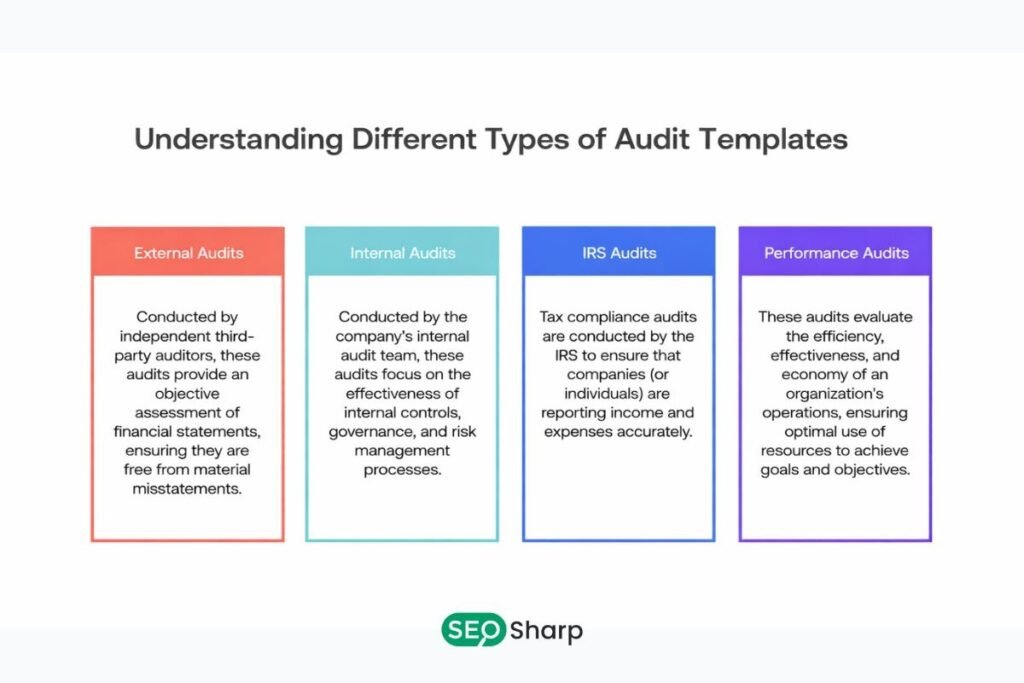
Various template formats serve different needs and skill levels.
Basic Checklist Templates
Simple checklists work well for small sites or beginners. They provide straightforward yes/no checks for essential SEO elements. A basic seo audit checklist template typically covers fundamental issues like title tags meta descriptions and basic technical settings. You can often find these as an seo audit checklist pdf or seo audit template pdf for easy printing and sharing.
While basic templates don’t offer deep analysis they help ensure you don’t miss obvious problems. They’re perfect for quick health checks or maintaining sites that are already well-optimized. Many teams reference an seo audit example when starting their first audit to understand what completed checks should look like.
Comprehensive Spreadsheet Templates
Detailed spreadsheet templates organize hundreds of audit points across multiple tabs. A robust website seo audit template includes sections for technical SEO on-page factors content quality and backlinks. These seo audit templates often incorporate priority rankings and action item tracking.
When examining an seo audit report template or seo site audit template look for clear documentation formats. The seo audit report format should make findings easy to understand even for non-technical stakeholders. Many agencies share a sample seo audit report with prospects to demonstrate their thoroughness.
Spreadsheet formats let you customize checks for your specific situation. An effective seo website audit template lets you add notes, assign tasks to team members and track fix completion over time. The structure supports both one-time audits and ongoing monitoring. Consider reviewing an seo audit sample before creating your own to understand industry standards.
Professional Audit Reports
Agency level reports demonstrate sophistication through detailed analysis and clear presentation. An seo audit report samples collection shows various approaches to documenting findings. The best seo audit sample reports combine data visualization with actionable recommendations.
When preparing client deliverables, study a sample seo audit to understand effective communication techniques. Many firms offer a free seo audit report sample on their websites to attract potential clients. An seo site audit report template helps maintain consistency across multiple client projects.
Automated Platform Reports
SEO platforms generate audit reports automatically by crawling your site and analyzing various factors. These reports identify issues at scale and prioritize them by severity. Modern seo technical audit template features include visual charts showing problem distribution and progress over time. Some platforms export findings as an audit seo pdf for offline review and sharing.
Automated reports excel at catching technical issues across large sites. They provide consistent scoring using a standard seo audit format that makes comparisons over time meaningful. The seo audit checklist 2020 introduced many checks that remain relevant today though best practices continue evolving. However they may miss strategic considerations that require human judgment.
When reviewing seo audit sample reports from automated tools pay attention to how they explain issues. The best platforms translate technical jargon into plain language that stakeholders can understand. This makes it easier to secure buy-in for implementing recommended fixes.
How to Prioritize Audit Findings?
Critical Issues: Address problems that completely block search engines or severely harm user experience immediately, site-wide indexing blocks major security vulnerabilities and broken navigation prevents access to key content.
High-Impact Opportunities: Focus on changes producing significant ranking gains like optimizing high-traffic pages with technical problems fixing crawl errors on important sections or improving poor Core Web Vitals scores.
Quick Wins: Tackle easy fixes requiring minimal effort like adding missing alt text fixing broken links compressing oversized images and writing better meta descriptions. These build momentum and demonstrate value.
Lower-Priority Optimizations: Handle minor issues and incremental improvements after critical problems. While these matter less individually they compound into meaningful improvements over time.
Creating Your Own SEO Audit Template
Start with Core Categories: Organize your template around technical on-page and off-page SEO. Within each category create subsections for related checks. This structure keeps items together and prevents important checks from getting lost.
Define Specific Checks: List specific items to verify for each category. Be detailed, instead of “check title tags” specify “verify title tags are unique under 60 characters and include target keywords.” Detailed checks ensure consistent audits.
Add Context: Explain why each check matters and what constitutes pass or fail. This transforms your template from a simple checklist into a learning tool that builds team knowledge.
Include Action Columns: Add columns for documenting findings assigning priorities noting responsible parties and tracking completion. This turns your template into a project management system.
Make it Repeatable: Design your template for reuse across multiple audits. Include date fields and save a clean master copy you can duplicate rather than starting from scratch every time.
How Often Should You Run SEO Audits?
Quarterly Audits for Most Sites: Running a full audit every three months catches issues before they accumulate into serious problems. This frequency lets you track progress on fixes and spot new issues from recent changes. Between full audits maintain ongoing monitoring of key metrics.
Monthly Monitoring for Large Sites: Large websites with thousands of pages or sites changing frequently benefit from monthly audits. E-commerce platforms, news sites and SaaS applications rolling out features regularly need this frequency to spot issues while they’re small.
Immediate Audits After Major Changes: Always audit after significant changes like website redesigns platform migrations or structural updates. Post-change audits catch unexpected problems before they impact rankings.
Using Audit Findings to Improve Rankings
Create an Implementation Plan: Translate findings into a concrete action plan. Group related fixes together assign clear owners and set realistic deadlines based on priority and resources.
Track Fix Completion: Monitor progress on implementing recommendations. Check off completed items and note any blockers. Regular status reviews keep momentum going.
Measure Results: After implementing fixes measure impact on organic traffic search rankings crawl errors page speed scores and conversion rates. This shows whether efforts are working.
Iterate and Refine: Use results from each audit cycle to improve your process. Add checks for new issues discovered, remove irrelevant items and adjust priorities based on which fixes delivered the biggest impact.
SEO Audit Template Best Practices
Keep Language Clear: Avoid technical jargon when possible. Your template should be understandable to anyone who might use it, not just SEO experts. Clear language ensures consistency and makes findings accessible to stakeholders.
Focus on Actionability: Every check should lead to clear action. Instead of vague items like “improve content quality” specify concrete steps like “add 300+ words to pages under 500 words.”
Balance Comprehensiveness with Practicality: Focus on checks that matter most. You can always expand coverage later. Practical templates get used regularly; comprehensive ones gather dust.
Update Regularly: Review and update your template at least annually to reflect current standards. Add checks for emerging issues and remove outdated items.
Common Mistakes to Avoid
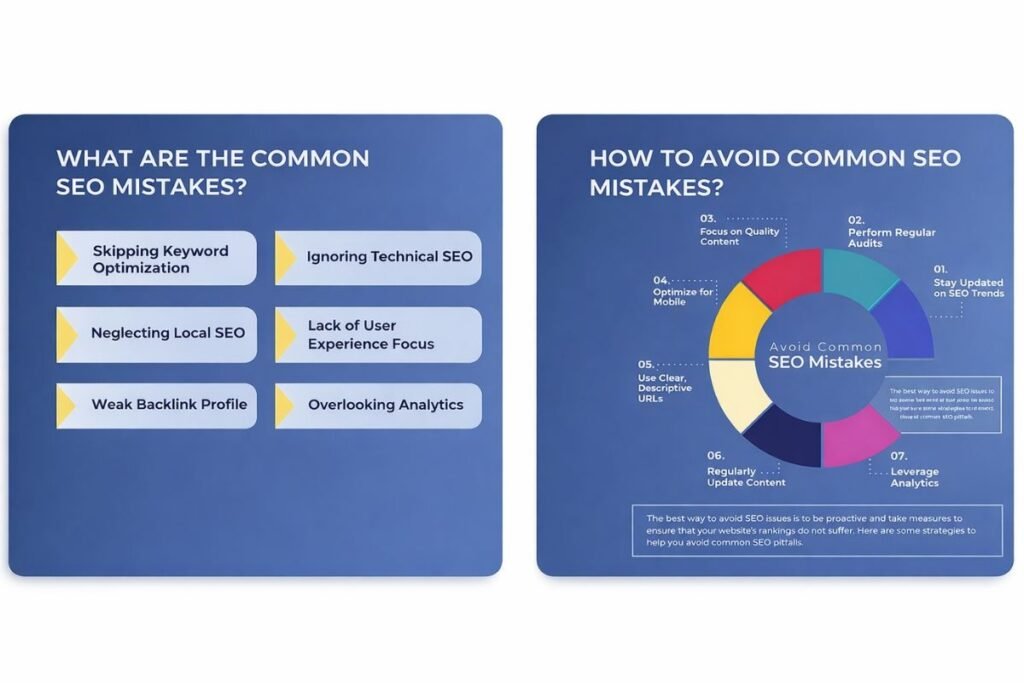
Auditing Without Acting: The biggest waste is discovering issues but never fixing them. Always plan implementation resources before starting an audit.
Focusing Only on Technical Issues: Technical problems are easy to identify but content quality and user experience often matter more for rankings. Balance technical fixes with content improvements.
Ignoring Mobile Experience: With mobile-first indexing your mobile site determines rankings even for desktop searches. Always include mobile-specific checks.
Treating All Issues Equally: Minor issues affecting single low-traffic pages matter far less than critical problems impacting your entire site. Prioritize by actual impact.
Running Audits Too Infrequently: Yearly audits let problems accumulate until they cause significant damage. Regular audits catch problems when they’re still easy to fix.
Conclusion
An SEO audit template gives you systematic control over your website’s search performance. It organizes everything you need to check into one clear framework that ensures you don’t miss critical issues affecting rankings.
When you follow a structured template regularly SEO becomes a predictable improvement process. You spot problems early, prioritize fixes by impact and measure results objectively. The best templates balance comprehensiveness with practicality, covering all important factors while remaining simple enough to use consistently.
Start with a basic template covering technical health, on-page optimization and backlink quality. Customize it for your situation, run audits quarterly and implement findings systematically. Over time your site grows stronger and more competitive in search results.
FAQs
What should an SEO audit template include?
A complete template covers technical SEO checks like crawling and indexing on-page factors including content and metadata and off-page elements such as backlinks. It should include specific checks for each area space to document findings priority assignments and action item tracking. The best templates also explain why each check matters and what constitutes passing or failing.
How long does a complete SEO audit take?
Audit duration depends on site size and depth of analysis. A basic audit of a small site might take 2-3 hours. Comprehensive audits of large sites can require several days. Using automated tools speeds up data collection but interpreting findings and creating action plans still requires significant time. Plan at least a full day for thorough audits of most business websites.
Can I audit my site without technical knowledge?
You can complete basic audits checking obvious issues like missing title tags, broken links and slow pages. However identifying complex technical problems typically requires SEO expertise. Consider using automated tools that explain issues in plain language or consult with technical SEO specialists for comprehensive audits. Learning SEO fundamentals helps you understand findings and prioritize fixes even without deep technical skills.
What’s the difference between a template and an audit report?
A template is the blank framework you use to conduct an audit—it lists what to check. An audit report documents your findings from using that template—it shows what issues exist on your specific site. Think of the template as your checklist and the report as your completed homework. Many people confuse these terms but understanding the distinction helps clarify your audit process.
How do I know which audit issues to fix first?
Prioritize issues that completely block search engines or severely harm user experience immediately. Next tackle changes likely to produce significant traffic gains like fixing crawl errors on important pages. Then address quick wins requiring minimal effort. Handle minor optimizations last. Focus on problems affecting many pages or high-traffic areas over isolated issues on low-value pages. Always consider both implementation effort and potential impact when prioritizing.



2 Responses
I appreciate how you mentioned that hidden technical issues can often be the silent killers of organic traffic. It’s not just about fixing content—addressing the underlying site performance is just as crucial.
Exactly, thanks for pointing this out.
Strong technical SEO quietly supports everything else ‘content, rankings, and user experience.’