
Linux lookup DNS is a core networking concept that every system administrator, DevOps engineer and Linux user must understand. Whenever you access a website, connect to a server or send an email DNS lookup processes work silently in the background to translate human readable domain names into machine understandable IP addresses.
Linux Lookup DNS systems can be performed using built in command-line utilities without relying on third party websites making troubleshooting faster, more secure and more reliable.
This article explains how Linux lookup DNS works, the most commonly used DNS lookup commands and how to troubleshoot name resolution issues effectively.
You will also learn how forward and reverse DNS queries function, how Linux decides which DNS server to query and how different tools behave under various scenarios. If you want a deep yet practical understanding of DNS lookup in Linux this guide will give you everything you need.
What Is Linux Lookup DNS?
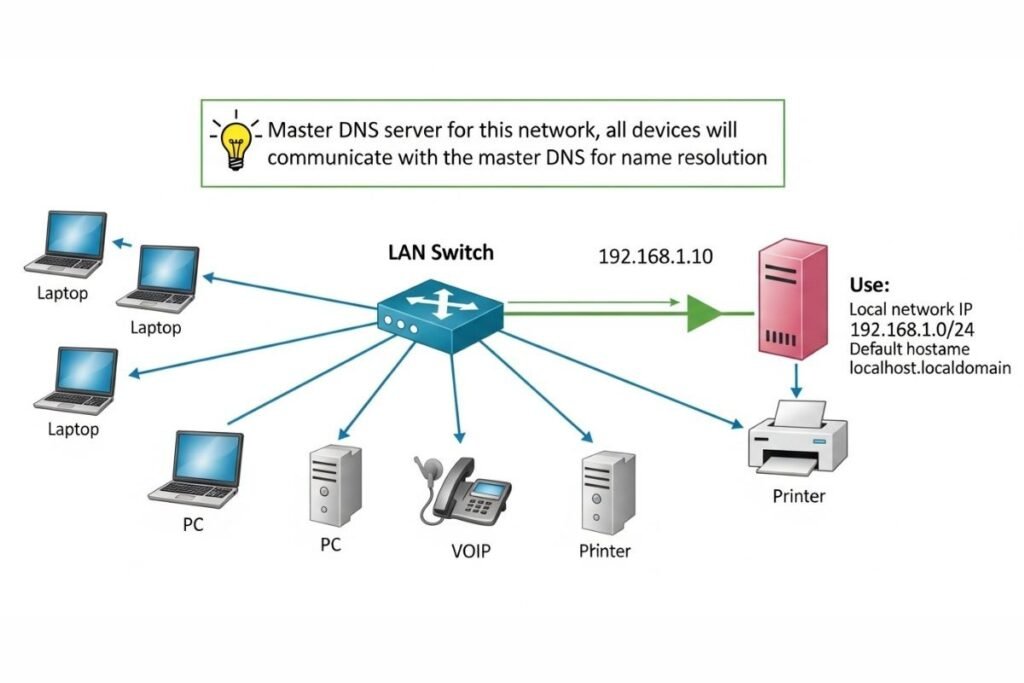
Linux Lookup DNS refers to the process of converting human-readable domain names into IP addresses or resolving IP addresses back into domain names. This translation is essential because computers communicate using IP addresses while users interact with domains.
Linux handles this process through a combination of DNS resolvers, system libraries and configuration files that determine how and where DNS records are searched.
Rather than relying on a single method Linux follows a flexible resolution strategy. Depending on system settings a lookup may be resolved using local configuration files cached results or external DNS servers.
This layered approach allows Linux systems to adapt to different environments such as local networks, enterprise servers or cloud infrastructures.
When a Linux application needs to connect to a hostname it does not contact a DNS server directly. Instead it passes the request to system libraries that follow a predefined lookup order.
These libraries may first check local mappings then consult name service modules and finally query configured DNS servers. Understanding this process is critical for diagnosing DNS errors, slow resolution or unexpected lookup behavior.
How Linux Performs DNS Name Resolution?
Linux does not rely on a single “DNS lookup command” internally. Most applications use standard system calls such as getaddrinfo which abstract the entire name resolution process.
These system libraries follow rules defined in configuration files and decide whether a query should be resolved locally or sent to an external DNS server.
The resolution process typically starts with local sources. If the requested hostname is not found the system proceeds to query DNS servers configured on the system.
This structured step-by-step approach allows Linux to support multiple name resolution mechanisms while maintaining compatibility with older systems and applications. Because this logic is handled at the system level DNS issues can affect multiple applications simultaneously.
Knowing how Linux performs name resolution helps administrators pinpoint whether a problem originates from local configuration DNS servers or application behavior.
Important Files Involved in Linux Lookup DNS
Linux DNS lookup behavior is controlled by several key configuration files each with a specific role. The resolv.conf file defines which DNS servers are used and how queries are processed. It acts as the primary reference for DNS resolution and determines where queries are sent.
The nsswitch.conf file controls the order in which name resolution sources are consulted. It specifies whether the system should check local files DNS or other services first. This file plays a major role in how quickly and accurately names are resolved.
The hosts file allows administrators to create static hostname-to-IP mappings. These entries override DNS results and are often used for testing development or emergency fixes. Together these files form the foundation of Linux DNS behavior and even small misconfigurations can lead to failed lookups, slow resolution or incorrect results.
Forward Linux Lookup DNS Explained
A forward DNS lookup resolves a domain name into an IP address. This is the most common DNS operation and occurs whenever a user accesses a website, connects to a server or runs a network-based application using a hostname.
Forward lookups typically query A records for IPv4 addresses and AAAA records for IPv6 addresses. Linux DNS lookup tools allow administrators to perform these queries directly from the command line making it easy to verify whether a domain resolves correctly.
By checking forward DNS results users can confirm that a domain points to the correct server, validate DNS changes and detect misconfigurations before they impact users or services.
Reverse Linux Lookup DNS
Reverse DNS lookup resolves an IP address back into a domain name using PTR records. Unlike forward lookups, reverse DNS is primarily used for validation logging and security purposes rather than everyday browsing.
On Linux systems reverse DNS lookups help administrators verify that an IP address is correctly associated with a hostname. This is especially important in environments where trust and identity verification matter such as mail servers and security systems.
Incorrect or missing reverse DNS records can cause issues with email delivery spam filtering and audit logs. Understanding how reverse DNS works allows administrators to proactively identify and fix these problems.
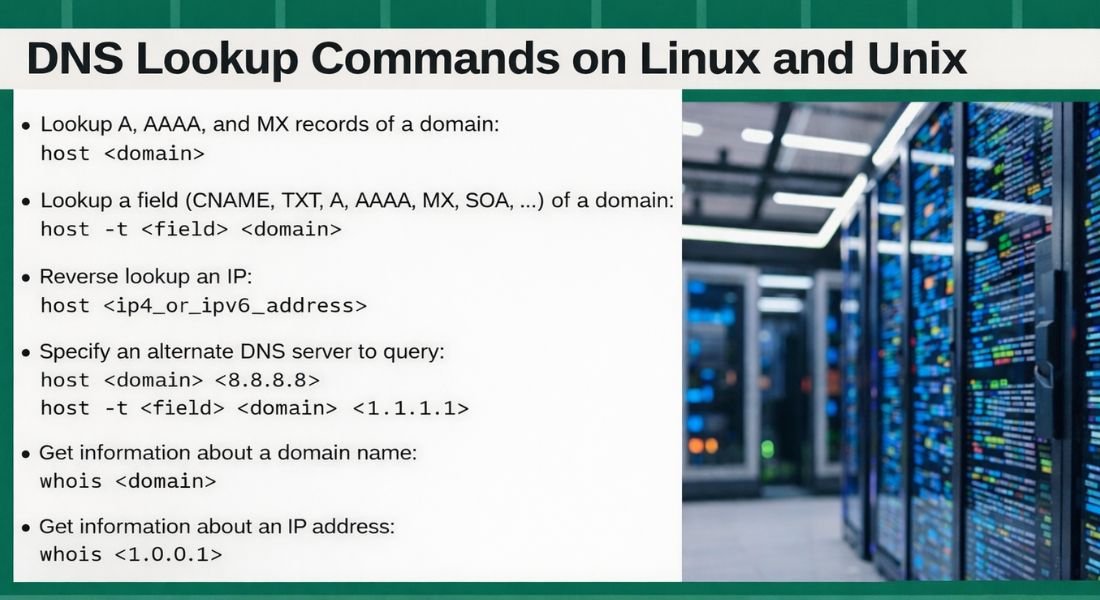
Linux Lookup DNS Using the host Command
The host command is one of the simplest tools for performing DNS lookups on Linux. It is designed to produce clean human-readable output making it ideal for quick checks and basic troubleshooting.
Administrators often use hosts when they need fast results without excessive technical detail. It supports both forward and reverse lookups and can query specific DNS record types such as A AAAA MX NS TXT CNAME and SOA.
The tool also allows querying specific DNS servers and forcing IPv4 or IPv6 resolution. This flexibility makes the host useful for validating DNS configurations and testing network behavior.
Linux Lookup DNS Using the dig Command
The dig command short for Domain Information Groper is a powerful and widely used DNS lookup tool. It provides detailed output that includes query timing response flags authority data and additional records.
Dig is especially valuable for advanced troubleshooting because it can trace the full DNS resolution path from root servers to authoritative name servers. This helps administrators understand exactly where a DNS query succeeds or fails.
With options for short answers server-specific queries and TTL inspection, dig is the preferred tool for diagnosing complex DNS issues and verifying authoritative responses.
Linux Lookup DNS Using nslookup
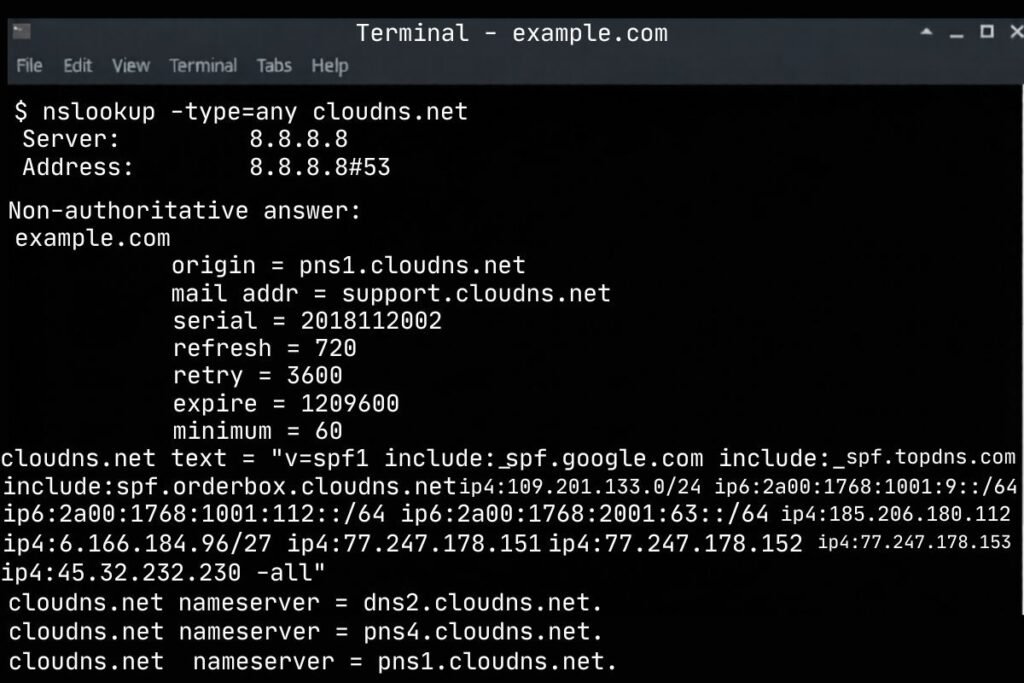
Nslookup is an older DNS lookup tool that remains available on many Linux systems. It supports both interactive and non-interactive modes and can perform forward and reverse DNS queries. While nslookup is easy to use, its output format is less consistent and harder to interpret compared to dig or host.
Despite this it remains popular because it is available on multiple operating systems including Windows. In mixed environments nslookup can be a convenient tool for quick cross-platform DNS testing.
Using ping for Basic DNS Testing
The ping command is often the first step in diagnosing DNS issues. Although ping is primarily a connectivity tool it performs DNS resolution when used with hostnames. If ping works with an IP address but fails with a domain name the issue is almost certainly DNS related.
This quick test helps distinguish between network connectivity problems and DNS resolution failures. Using ping early in troubleshooting saves time and helps narrow down the root cause of connection issues.
Querying Specific DNS Record Types
Linux DNS lookup tools allow administrators to query individual DNS record types to diagnose specific problems. A records map domains to IPv4 addresses while AAAA records handle IPv6 resolution.
MX records define mail servers NS records identify authoritative name servers and TXT records store metadata such as SPF DKIM and verification tokens.
Querying these records individually helps confirm that DNS configurations are correct and fully propagated. This targeted approach makes troubleshooting faster and more precise.
Querying a Specific DNS Server
Linux lookup DNS commands can query a specific DNS server instead of relying on the system default. This is particularly useful when testing new DNS settings or diagnosing propagation delays.
By querying individual servers directly administrators can compare responses and identify discrepancies between authoritative and recursive resolvers. This technique is essential for validating DNS changes before they go live.
IPv4 and IPv6 Linux Lookup DNS
Linux fully supports both IPv4 and IPv6 DNS resolution. DNS lookup tools allow users to force queries over either protocol making it easy to test dual stack environments.
This is important because services may behave differently depending on whether IPv4 or IPv6 is used. Testing both ensures compatibility performance and accessibility across modern networks.
Understanding DNS Lookup Output and TTL Values
DNS lookup responses include TTL values that determine how long records are cached. TTL plays a major role in DNS performance and propagation behavior.
Lower TTL values allow faster updates but increase query frequency while higher TTL values improve performance but slow down changes. Linux DNS lookup tools make it easy to inspect TTL values and understand caching effects.
Common DNS Lookup Problems in Linux
DNS lookup problems in Linux are often caused by misconfigured resolvers, unreachable DNS servers, incorrect host entries or broken caching services. These issues may appear as slow resolution intermittent failures or incorrect IP results.
By testing forward and reverse lookups, querying specific records and reviewing configuration files administrators can quickly identify the source of DNS problems.
Best Practices for Linux DNS Troubleshooting
Effective DNS troubleshooting starts with checking basic connectivity followed by validating local configuration files and DNS server responses. Using multiple tools provides different perspectives on the same issue.
Regularly verifying DNS changes, monitoring TTL values and understanding resolution order help prevent future problems and ensure reliable name resolution.
Why Does Linux DNS Lookup Knowledge Matters?
DNS is a foundational component of modern infrastructure. Linux systems power servers containers and cloud platforms where DNS reliability directly impacts uptime and performance.
Understanding Linux DNS lookup processes enables faster troubleshooting stronger security practices and more stable systems. Administrators who master DNS tools can resolve issues confidently and maintain smooth network operations.
Conclusion
Linux lookup DNS is far more than a simple command-line task. It is a layered process involving system libraries, configuration files, DNS resolvers and network protocols. By understanding how Linux performs DNS lookups and how to use tools like host dig nslookup and ping you gain complete control over name resolution troubleshooting.
Whether you are managing servers, developing applications or maintaining network infrastructure, mastering Linux DNS lookup techniques will help you resolve issues faster and build more reliable systems. With the right knowledge and tools DNS problems become easier to diagnose and fix.
FAQs
What is Linux lookup DNS used for?
Linux lookup DNS is used to resolve domain names into IP addresses and IP addresses back into domain names. It enables Linux systems to communicate with network services reliably.
Which is the best Linux DNS lookup command?
There is no single best command. Host is simple, dig is detailed and nslookup is widely available so the choice depends on your troubleshooting needs.
Can Linux perform reverse DNS lookups?
Yes Linux supports reverse DNS lookups using PTR records. Tools like dig and host can resolve IP addresses back to hostnames.
Why does DNS lookup fail on Linux sometimes?
DNS lookup failures usually occur due to misconfigured DNS servers, incorrect resolver settings or network connectivity issues.
Is DNS lookup different for IPv6 on Linux?
The process is similar but IPv6 uses AAAA records and different addressing formats. Linux DNS tools fully support IPv6 lookups.