
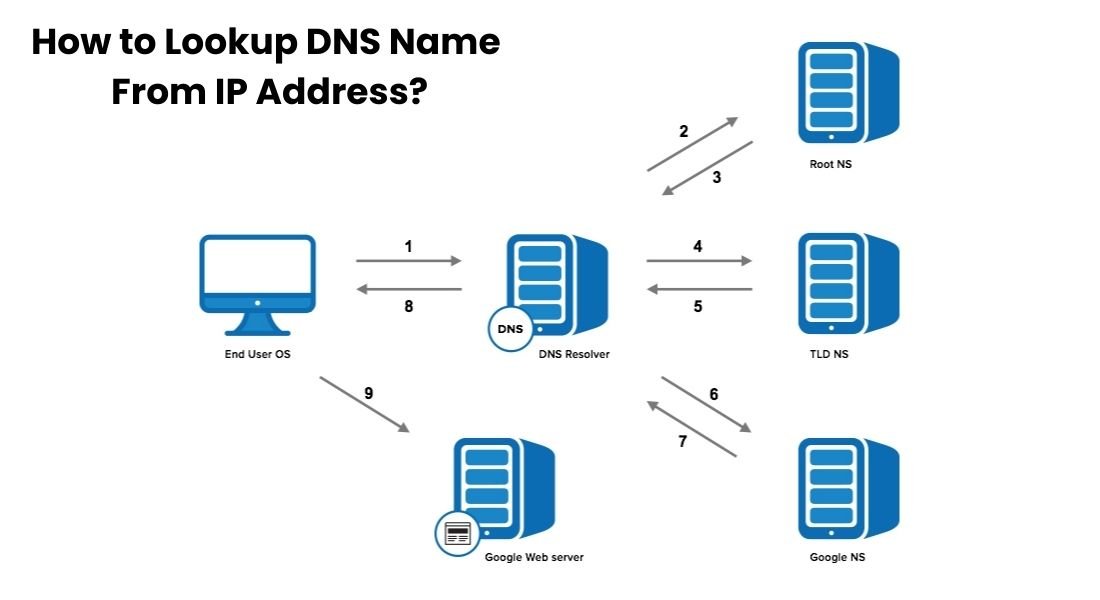
Looking up a DNS name from an IP address also known as a reverse DNS lookup means finding the hostname or domain linked to a specific IP. Unlike the usual DNS lookup that translates a domain into an IP address, reverse DNS works in the opposite direction. It starts with an IP and tries to resolve it to a hostname.
People often perform reverse DNS lookups when they need clarity about servers, email sources, network traffic or system configurations. Performing this lookup correctly saves time prevents misinterpretation and allows you to make confident technical decisions without guessing.
Understanding How to Lookup DNS Name From IP Address?
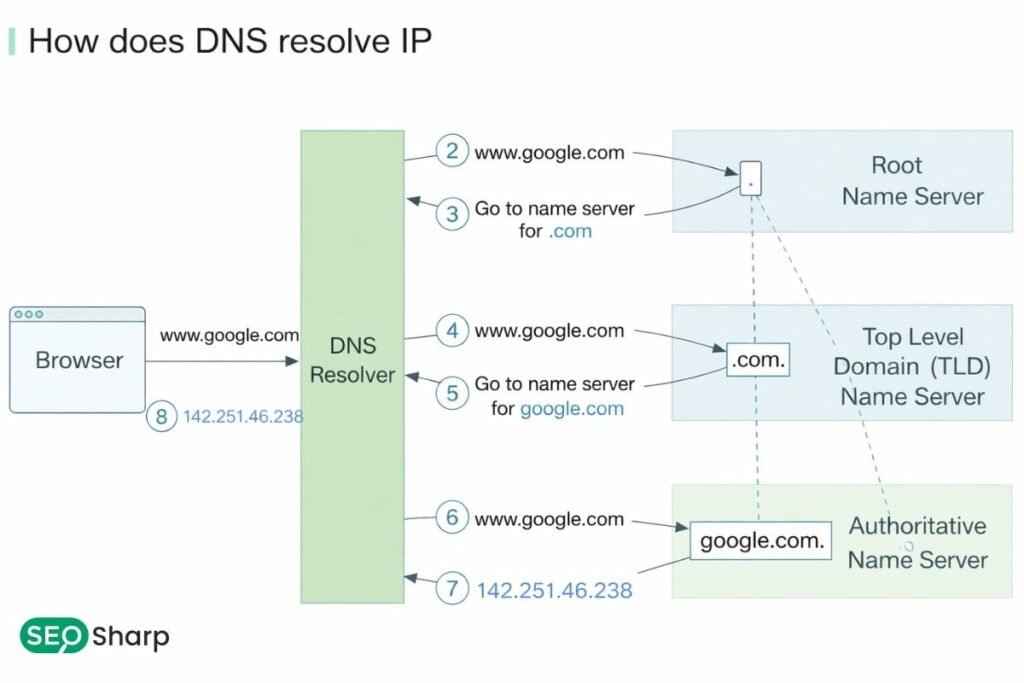
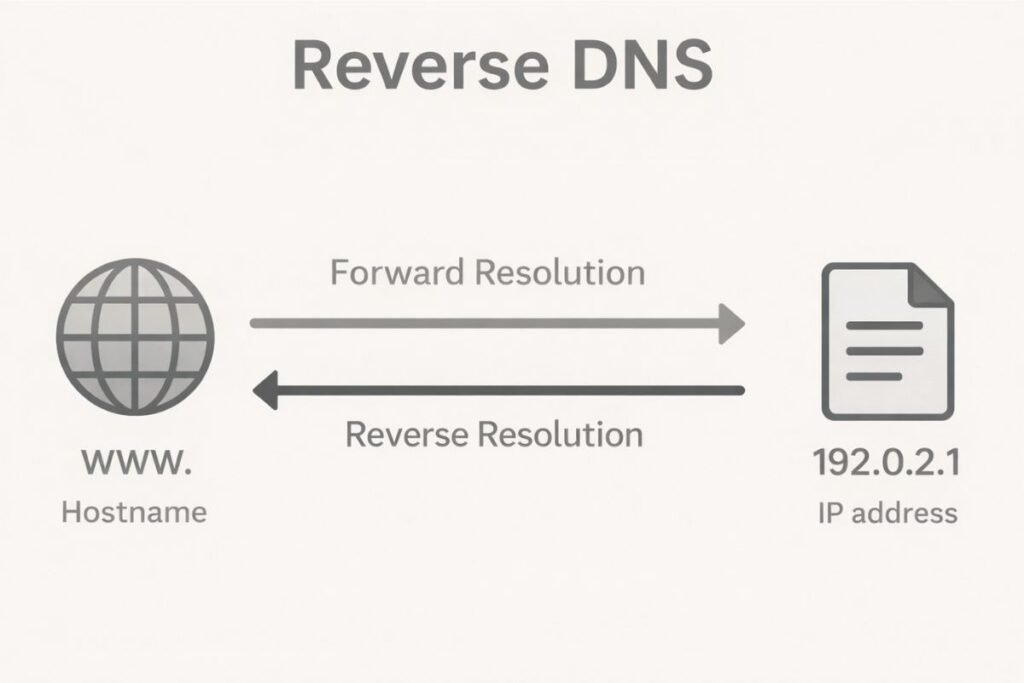
Reverse DNS lookup relies on PTR records in the Domain Name System. Normally DNS converts human readable domains into IP addresses so computers can communicate. Reverse DNS starts with an IP address and queries DNS servers to find the corresponding hostname.
This process only works if the IP owner has configured a PTR record. Public domains usually have forward DNS records but reverse records are optional. If no PTR record exists no hostname will appear no matter which tool or command you use.
Understanding this early prevents confusion as a failed lookup doesn’t mean the method or tool is broken; it often means the data simply doesn’t exist.
Why Reverse DNS Exists and Why It Is Important?
Reverse DNS provides identity and trust for IP addresses. Systems servers and applications use it to verify that an IP maps back to a recognizable hostname. Email servers rely heavily on reverse DNS to reduce spam.
When a server sends an email receiving servers check if the IP has a valid PTR record that aligns with forward DNS records. Without this alignment emails can go to spam or get rejected entirely.
Beyond email reverse DNS helps network administrators analyze traffic, identify unknown devices, troubleshoot connectivity issues and validate infrastructure setups.
Hostnames give context to raw IP addresses making logs and network data easier to interpret. Proper reverse DNS configuration also helps security teams verify network activity and avoid misinterpretation.
The Core DNS Concept Behind Reverse Lookup
Reverse DNS uses a PTR (Pointer) record to map an IP address back to a hostname. IPv4 PTR records live in the in-addr.arpa namespace. To perform a lookup the system reverses the IP octets and appends them to this namespace.
For example the IP 8.8.8.8 becomes 8.8.8.8.in-addr.arpa for the query. IPv6 addresses use the ip6.arpa namespace and reverse the address at the nibble level which creates much longer queries because IPv6 addresses are hexadecimal.
When you query a PTR record the DNS server returns the hostname if it exists. If not the lookup yields no result. This system explains why reverse DNS sometimes fails especially for residential dynamic or internal IPs.
Forward DNS vs Reverse DNS and Why They Are Not Interchangeable
Many beginners assume that if a domain points to an IP the IP must also resolve back to that domain. This is incorrect. Forward DNS uses A and AAAA records to map domains to IP addresses while reverse DNS uses PTR records to map IPs to hostnames. One can exist without the other.
This independence means you cannot reliably use forward lookup zones to perform reverse lookups unless PTR records are explicitly configured. Network professionals must understand this to avoid misinterpretation and troubleshooting errors.
When Looking Up DNS Name From IP Address Works Perfectly?
Reverse DNS works reliably when IP ownership and DNS configuration are professionally managed. Public DNS services like Google or Cloudflare almost always return meaningful hostnames.
Hosting providers and enterprise servers usually match reverse DNS to forward DNS entries. For instance querying Google’s public DNS IP 8.8.8.8 typically returns dns.google.
These accurate results make reverse lookups trustworthy allowing you to identify the service server location or organization behind an IP.
When Reverse DNS Lookup Fails and Why Is It Normal?
Many IPs lack PTR records. Residential ISPs dynamically assigned IPs internal networks and poorly configured servers often return no hostname. Another reason is mismatched control: the IP owner manages reverse DNS while the domain owner manages forward DNS.
If these entities don’t coordinate, reverse DNS may be absent or point to a generic hostname. A missing result is not a failure of the tool or method. It simply indicates that DNS data does not exist for that IP. Understanding this prevents frustration and incorrect conclusions.
How to Lookup DNS Name From IP Address Using Online Tools?
Online DNS lookup tools make reverse lookups simple. Enter an IP address and the tool queries multiple DNS servers to check for PTR records. If a record exists it displays the hostname; if not it indicates no reverse DNS record is found.
These tools suit non-technical users quick checks or situations where command-line tools aren’t available. They also show results from different geographic DNS resolvers providing a broader perspective.
How Command-Line Tools Perform Reverse DNS Lookups?
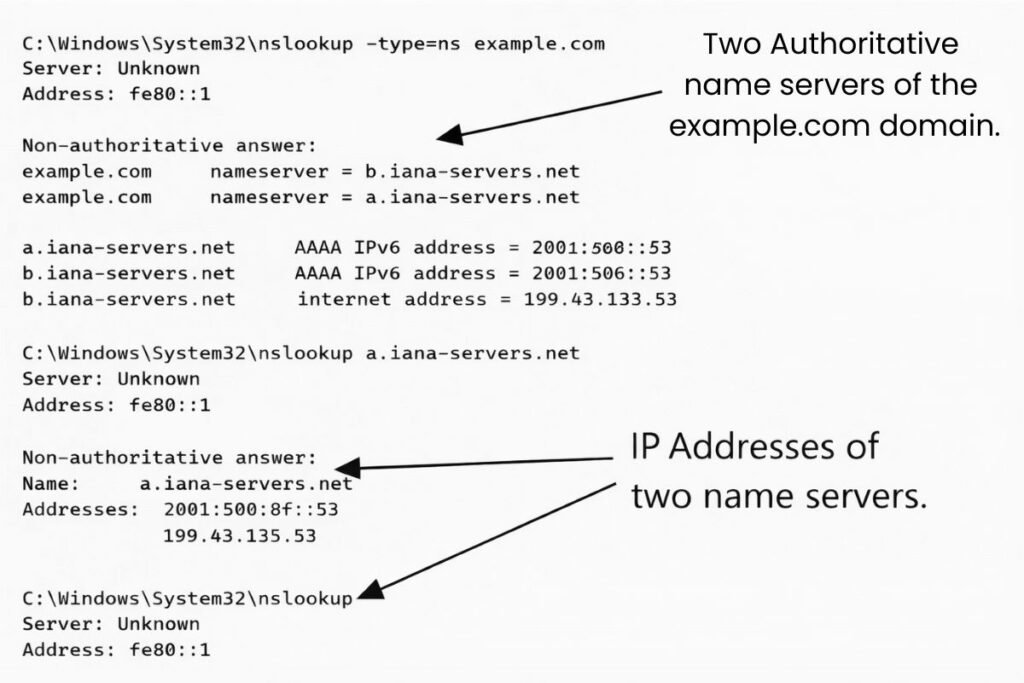
Command-line utilities offer control and transparency. On Windows nslookup and ping -a can perform reverse lookups. On Linux and macOS dig -x and host commands query DNS servers directly.
Command line outputs reveal raw PTR records and help troubleshoot issues when results are missing or unexpected. Using these commands gives you hands-on understanding of how reverse DNS works and ensures you can interpret tool results accurately.
Understanding Reverse DNS Results and Hostname Formats
A successful reverse lookup may return a hostname that differs from the website domain you expect. Hosting providers or ISPs often use internal naming conventions describing server location network segments or roles.
Reverse DNS identifies the hostname assigned to an IP not all domains hosted on it. Multiple domains can share a single IP but the PTR record will return only one hostname. Understanding this prevents confusion and misinterpretation of results.
IPv4 vs IPv6 Reverse DNS Lookups
IPv4 reverse DNS queries use in-addr.arpa reversing IP octets. IPv6 queries use ip6.arpa reversing nibbles resulting in longer and more complex queries. Despite structural differences both rely on PTR records to map IPs to hostnames.
With IPv6 adoption increasing understanding these lookups becomes critical for modern email systems network monitoring and cloud infrastructure.
Practical Use Cases for Looking Up DNS Name From IP Address
Network administrators use reverse DNS to identify devices and troubleshoot servers. Security teams analyze traffic, detect suspicious activity and validate IP ownership. SEO professionals and website owners check hosting environments, shared infrastructure or unusual referral sources.
Email administrators ensure PTR records match forward DNS to maintain deliverability and sender reputation. Accurate reverse DNS prevents misinterpretation and saves time across all these scenarios.
How Reverse DNS Fits Into the Larger DNS Ecosystem?
Reverse DNS is part of the broader DNS ecosystem. It works with forward lookups caching TTL values and resolver behavior. Caching affects results because changes to PTR records may take minutes to days to propagate. Understanding caching helps explain why reverse DNS updates don’t appear instantly worldwide.
Security and Privacy Considerations
Reverse DNS only reveals what the IP owner publishes publicly. It does not expose private information. Hostnames can be misleading, generic or intentionally vague. Therefore use reverse DNS as a contextual signal not as definitive proof of identity.
Troubleshooting Reverse DNS Lookup Issues
When reverse DNS fails first check whether the IP is public and routable. Private IPs lack public PTR records. Then verify whether the IP owner has configured PTR records.
If you manage the IP, adjust records through your ISP or hosting provider. If not you cannot create PTR records yourself. Understanding ownership boundaries prevents wasted troubleshooting effort.
How Reverse DNS Relates to Email Deliverability
Email servers rely on reverse DNS to prevent spam. Receiving servers check whether the sending IP has a PTR record matching the domain’s forward DNS. If this alignment is missing, emails may get flagged or rejected. Correct reverse DNS setup improves deliverability but its absence almost guarantees email issues.
Why Tools Alone Are Not Enough Without Understanding?
Many users rely only on tools. When results are empty they assume the tool is broken. In reality the tool accurately reflects DNS data. Understanding reverse DNS allows you to interpret results correctly combined with contextual knowledge and troubleshoot effectively.
Bringing It All Together
Reverse DNS lookup is not magic. It queries PTR records and depends on whether reverse records exist. With this knowledge you can perform lookups confidently, explain results and avoid misconceptions. Online tools or command line utilities both use the same underlying process making the lookup predictable and reliable.
Conclusion
Learning how to lookup DNS name from IP address replaces guesswork with clarity. You now understand why results succeed or fail, why hostnames may look unusual and how reverse DNS integrates into email server management traffic analysis and network troubleshooting. Combining clear understanding with the right tools makes DNS predictable and practical.
At SEOSharp we make technical processes simple. Our free DNS lookup tool lets you perform reverse lookups instantly while understanding the results giving you both answers and context without technical friction.
FAQs
Why does reverse DNS lookup return no result for some IP addresses?
Some IPs do not have PTR records. This is common for residential dynamic or internal network IPs and does not indicate a problem with your lookup method.
Can reverse DNS show all domains hosted on an IP address?
No. Reverse DNS only returns the single hostname assigned via PTR. It cannot list all domains sharing the IP.
Is reverse DNS lookup the same as reverse IP lookup?
Yes both refer to resolving an IP to a hostname using PTR records although some tools may use the terms differently.
Does reverse DNS work for private IP addresses?
No. Private IPs do not have public PTR records. Reverse lookups only work for public routable IPs.
How long does it take for reverse DNS changes to appear?
Reverse DNS updates follow DNS TTL values. Propagation can take minutes to 48 hours globally.


2 Responses
I always found reverse DNS a bit tricky at first, especially when a PTR record is missing. Understanding that it’s not a failure but just a lack of data is really helpful.
Exactly, a missing PTR record can seem like an error, but it usually just means reverse DNS isn’t configured. That clarity makes troubleshooting much easier. You can always check PTR records using our free DNS Lookup tool at Seosharp.com