
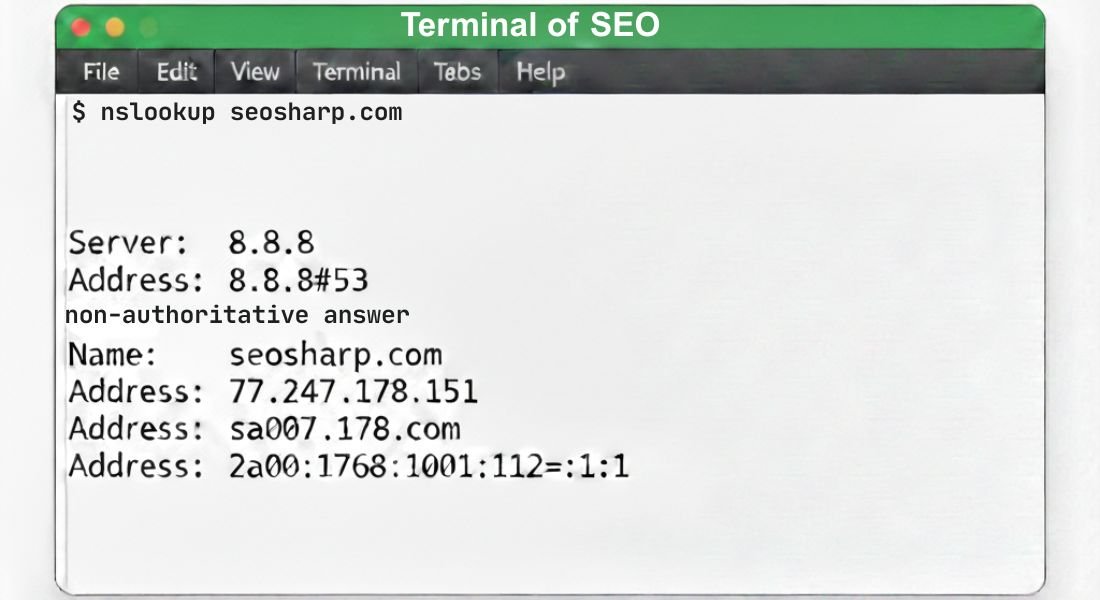
DNS is the backbone of the internet. Every website SaaS application email system and API depends on DNS resolution to function properly. When DNS fails everything can feel broken even when servers are running perfectly.
A DNS resolve command gives you a direct view of how your system translates domain names into IP addresses allowing you to troubleshoot issues, verify configuration and ensure reliability.
In this comprehensive guide we will cover everything from the basics of DNS resolution to advanced troubleshooting using nslookup dig resolve dnsname and other tools.
You’ll learn how to run these commands on Windows macOS and Linux, understand DNS record types, optimize performance and secure your system against attacks like DNS spoofing or cache poisoning.
Additionally we will show how combining command line checks with an online DNS lookup tool like SEOSharp provides a complete picture of global DNS behavior.
What Is a DNS Resolve Command?
A DNS resolve command is a system level instruction used to query a DNS server and translate a human readable domain name into an IP address that computers can understand.
Unlike browsers which often cache results or hide the details of DNS queries, a DNS resolve command provides real time accurate and raw DNS information directly from the resolver.
This allows users, administrators and developers to verify IP address resolution, check DNS server responses and detect misconfigurations that might affect websites email systems or SaaS applications.
Common tools for performing this include nslookup dig resolve-dnsname and host each providing slightly different features but all serving the same purpose of giving visibility into how the domain name system operates.
By using a resolve command you can confirm whether a domain is reachable, ensure proper DNS propagation and troubleshoot issues such as slow DNS responses, incorrect records or errors caused by recursive DNS resolvers or authoritative DNS servers.
What Does a DNS Resolve Command Actually Do?
A DNS resolve command sends a query directly to a DNS server asking it to convert a human-readable domain name into an IP address that computers can understand.
Unlike web browsers which often cache results and hide the details of DNS queries, resolve commands provide raw real time data showing exactly which server your system is contacting and what response it receives.
This allows administrators and developers to identify misconfigurations, verify IP address resolution and ensure their domain name system is functioning as expected.
Tools such as nslookup dig resolve-dnsname and host provide different ways to inspect DNS records giving users flexibility for troubleshooting both locally and across networks.
How Does DNS Resolution Work Behind the Scenes?
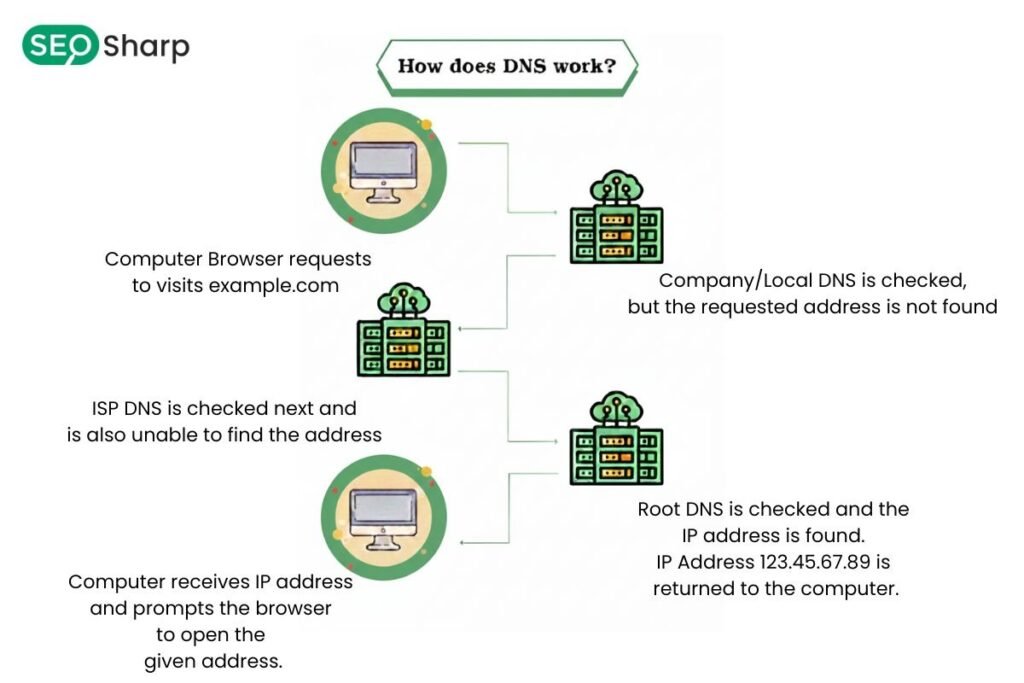
Although DNS resolution seems instant to users it involves a series of precise steps. When a query is initiated the system first checks the local DNS cache to determine if a valid record is available.
If no cached information exists the query is forwarded to a recursive DNS resolver which systematically contacts root servers, top level domain servers and finally the authoritative DNS server for the domain.
The authoritative server responds with the correct IP address which the resolver returns to the client and temporarily stores for future queries.
This workflow directly impacts DNS performance speed and reliability and understanding it is essential for diagnosing issues related to slow load times propagation delays or misconfigured records.
Why Do People Use DNS Resolve Commands Instead of Browsers?
Browsers are designed to simplify DNS queries but that simplicity can obscure the underlying process. They cache DNS responses, implement fallback strategies and may provide outdated or misleading results during failures.
Running a DNS resolve command exposes the exact DNS server response without any browser interference. This approach allows users to identify whether problems originate from the network hosting application or DNS configuration itself.
It becomes especially critical when troubleshooting website downtime network connectivity issues, email delivery problems and slow SaaS applications as it removes guesswork and shows the true status of the domain resolution process.
DNS Resolve Command Options on Different Operating Systems
DNS resolve commands vary across operating systems offering different tools and options to query DNS servers, verify records and troubleshoot resolution issues.
Each operating system provides unique commands tailored to its environment and understanding these differences ensures accurate diagnostics and performance checks.
By knowing which commands to use and how they operate users can confirm DNS server responses, identify misconfigurations and ensure IP address resolution works correctly across local and global networks.
The main operating systems covered are Windows Linux and macOS each providing native tools and syntax for effective DNS analysis.
DNS Resolve Commands on Windows
On Windows DNS resolution can be performed using Command Prompt or PowerShell. The classic nslookup command allows users to query DNS records and retrieve IP addresses for domains.
PowerShell expands this functionality through Resolve-DnsName which supports specifying record types, tracing query paths and filtering results.
Windows systems often cache DNS heavily so running these commands also helps determine whether cached entries are affecting results and when flushing the cache might be necessary.
These commands give administrators precise insight into which DNS server whether an ISP resolver, a public provider or a corporate server is being used, making DNS troubleshooting latency checks and propagation verification more reliable.
DNS Resolve Commands on Linux
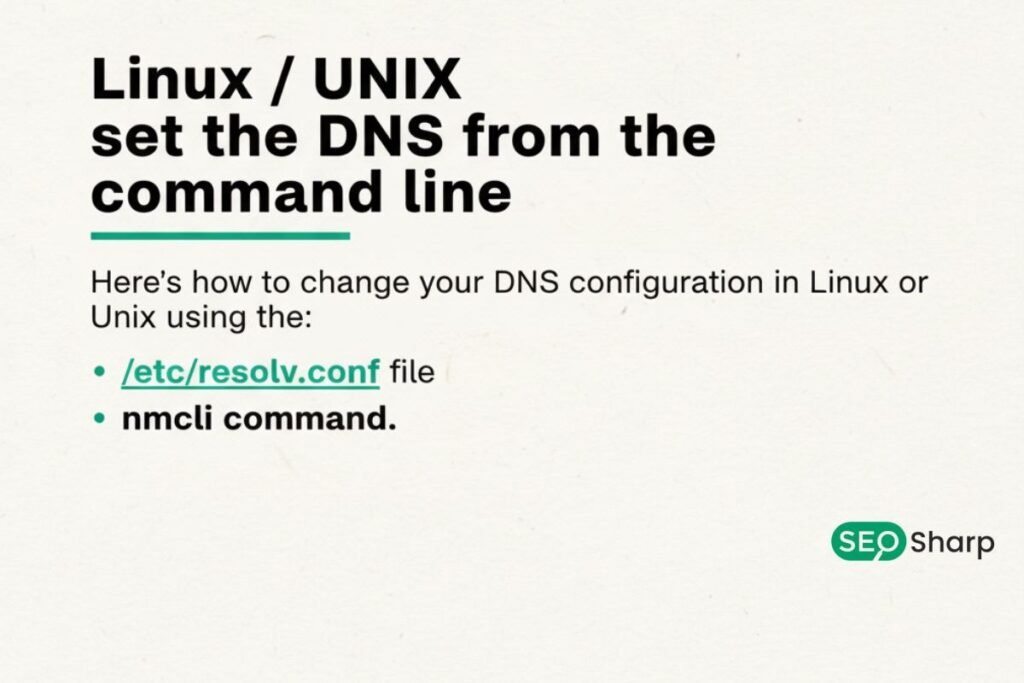
Linux systems provide flexibility and transparency in DNS resolution. Tools like dig nslookup and host allow administrators to query DNS servers and retrieve detailed information about records and their TTL values.
Depending on the Linux distribution DNS resolution may be handled by systemd-resolved NetworkManager or static configuration files.
Running resolve commands on Linux not only reveals which DNS servers are in use but also shows the exact query path and responses which is essential for troubleshooting network connectivity issues propagation delays and DNS misconfigurations on servers or containerized environments.
DNS Resolve Commands on macOS
MacOS supports DNS resolution through terminal based commands such as dig nslookup and host. Since macOS can use multiple resolvers simultaneously for Wi-Fi Ethernet VPNs and application specific settings results may vary depending on resolver priority.
Using these commands allows users to observe multiple IP responses, confirm authoritative server data and troubleshoot why a domain might work on one network but fail on another.
Understanding resolver behavior and caching on macOS is critical for testing staging environments verifying propagation and diagnosing DNS misconfigurations effectively.
How Does DNS Resolve Command Work in PowerShell?
PowerShell offers advanced functionality for DNS resolution giving users the ability to inspect query paths, specify record types and test live responses with precision.
Unlike simpler tools such as nslookup or host PowerShell provides granular insight into how DNS queries traverse through recursive resolvers and reach authoritative DNS servers.
This makes it particularly useful for enterprise-level troubleshooting automated diagnostics and ongoing monitoring of DNS performance latency and reliability.
Administrators can for example check AAAA MX or TXT records directly from PowerShell, trace the query path to identify bottlenecks and determine whether the system or network caching is causing discrepancies in resolution.
By pairing these commands with an online DNS lookup tool users can visually confirm results, compare local and global DNS responses, detect propagation delays and validate proper configuration across multiple DNS servers.
This combined approach reduces misinterpretation of command outputs, speeds up troubleshooting and ensures that critical services like websites, SaaS applications and email systems maintain consistent reliability and trust.
What Types of DNS Records Can a Resolve Command Return?
A DNS resolve command can return several record types each serving a distinct purpose. A and AAAA records map domains to IPv4 or IPv6 addresses MX records define email routing TXT records store verification and security information NS records identify authoritative DNS servers and SOA records provide primary server and zone information.
PTR records allow reverse IP lookups. Understanding which record is being retrieved is crucial for verifying configuration, ensuring email delivery, maintaining DNS security and performing clean migrations or updates without causing service disruptions.
Why Does a DNS Resolve Command Sometimes Return Different Results?
DNS responses can vary due to caching resolver location network configuration or propagation delays. A resolver in one country may provide a different answer than a resolver elsewhere due to geo routing load balancing or other DNS optimization mechanisms.
Cached entries can also mask recent updates making it appear as though changes have not propagated. Using a DNS resolve command exposes these differences while online DNS lookup tools confirm whether discrepancies are local, regional or global giving administrators the full picture of DNS propagation and query path behavior.
How Does DNS Resolve Command Help Troubleshoot DNS Issues?
DNS resolve commands are essential tools for diagnosing a wide range of DNS problems providing clear insight into why a domain may not be resolving correctly. They can reveal whether issues stem from misconfigured DNS records, authoritative server errors, expired or outdated configurations or problems with local or network resolvers.
These commands also help distinguish between issues affecting only the local system and delays caused by global DNS propagation which is especially important when recent changes have been made to a domain.
By running resolve commands alongside an online DNS lookup tool users can compare local and global responses, validate the accuracy of DNS records and detect inconsistencies in real time.
This combined approach removes guesswork, speeds up troubleshooting and ensures that websites SaaS applications and email systems maintain fast resolution, consistent reliability and overall trust.
Additionally, using these commands regularly can help identify recurring DNS performance issues, monitor resolver behavior and latency and proactively prevent outages or service disruptions.
.When Should You Use a DNS Resolve Command vs a DNS Lookup Tool?
DNS resolve commands provide low-level insight and precise information about the system’s current view while online DNS lookup tools offer broader global visibility and context.
Commands are ideal for local diagnostics automation and deep troubleshooting whereas lookup tools confirm how the domain appears to users worldwide.
The best approach combines both: resolve commands verify the system’s perspective while online tools validate global propagation DNS server responses and resolver reliability. Together they create a comprehensive workflow for troubleshooting auditing and optimizing DNS.
How Does DNS Resolution Impact Website Performance and Trust?
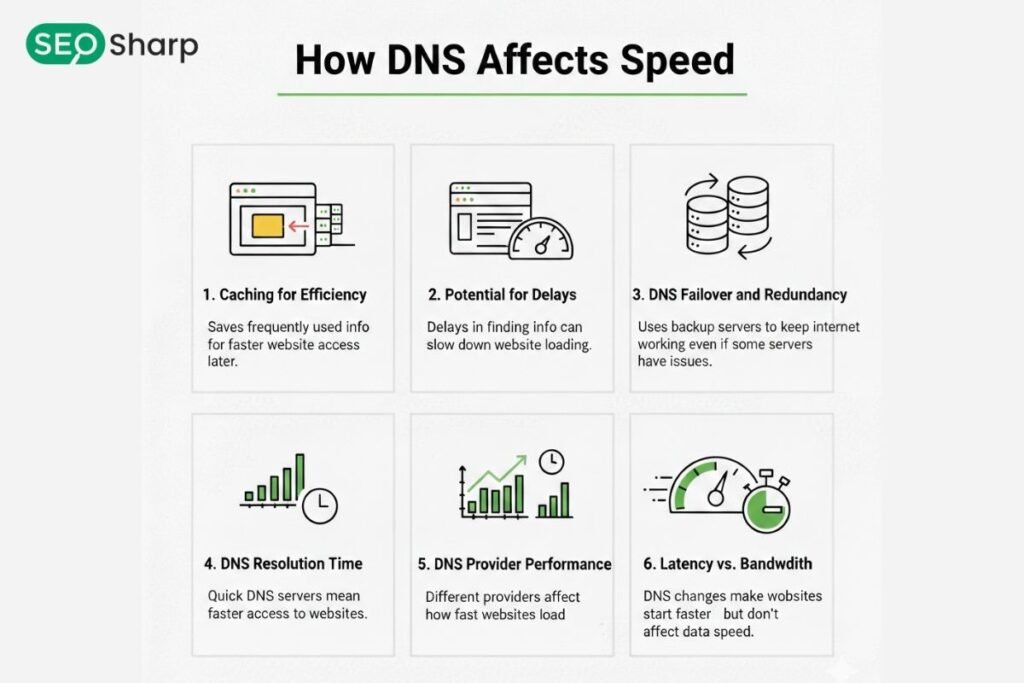
DNS resolution directly affects user experience, application performance and overall trustworthiness. Slow or misconfigured DNS adds latency before any content loads which can frustrate users and negatively impact websites SaaS applications and APIs.
Reliable DNS ensures faster IP address resolution helping improve email delivery API response times and integration stability. It also indirectly supports SEO by maintaining consistent uptime reducing page load delays and enhancing overall site performance.
By actively monitoring DNS server performance, caching behavior resolver priority and global response organizations can reduce technical errors, minimize downtime and provide a smoother, more trustworthy experience for users.
Conclusion: Use DNS Resolve Commands With Confidence
A DNS resolve command gives you precise actionable insights into how domain names translate into IP addresses. By understanding the full DNS resolution process performing local and global checks and validating results with SEOSharp or similar DNS lookup tools you can troubleshoot issues quickly ensure fast resolution and maintain reliable and secure network operations.
Whether you manage websites, SaaS apps or email systems using resolve commands with reliable tools ensures faster answers, fewer mistakes and more confident technical decisions.
DNS troubleshooting doesn’t have to be confusing; armed with these techniques you can turn complex DNS data into clear actionable insights.
FAQs
Can DNS resolve commands help detect DNS spoofing attacks?
Yes. By comparing responses from different DNS servers a resolve command can reveal inconsistencies caused by malicious DNS spoofing or cache poisoning. This helps IT teams validate trustworthiness and protect users from fake IP addresses.
How can I automate DNS checks using resolve commands?
You can create scripts in PowerShell Bash or Python to run DNS resolve commands at scheduled intervals. Automation allows continuous monitoring of IP changes, record validity and propagation delays reducing manual effort and catching issues early.
Are there differences in DNS resolve results between IPv4 and IPv6 queries?
Yes. A records return IPv4 addresses while AAAA records return IPv6 addresses. Some servers may respond differently to each query type depending on network setup firewall rules or dual-stack configurations.
How do DNS resolve commands help with multi region SaaS applications?
By querying different DNS resolvers across regions you can confirm that users worldwide receive the correct IP addresses. This ensures load balancing and routing configurations work properly preventing downtime or slow service in specific regions.
Can resolve commands verify email delivery routes?
Absolutely. Using MX record queries you can verify which mail servers a domain uses and confirm priority settings. This helps troubleshoot email delivery failures or misconfigured SMTP servers.
How do DNS resolve commands interact with CDN networks?
CDNs often use geo based DNS responses to route users to the nearest server. Resolve commands allow you to check if the DNS returns the expected edge server IP ensuring optimal content delivery and low latency for global users.
Can resolve commands help with subdomain verification?
Yes. You can run queries for subdomains individually to ensure they resolve correctly. This is critical when deploying new services staging environments or API endpoints without disrupting existing DNS configurations.
How do cached DNS entries affect resolve command outputs?
Cached entries can sometimes return outdated results making it seem like DNS changes haven’t propagated. Running the command with a different resolver or clearing local caches ensures you get accurate real time data.
Can DNS resolve commands to test SRV or TXT records for advanced services?
Definitely. You can query SRV records to verify service endpoints for VoIP XMPP or other protocols and TXT records for SPF DKIM or other verification settings. This helps validate service availability and security configurations.
How can resolve commands improve network troubleshooting for developers?
Developers can trace query paths, identify slow or misconfigured DNS servers and verify propagation before releasing updates. This reduces downtime, improves SaaS performance and ensures smooth user experiences across devices and regions.