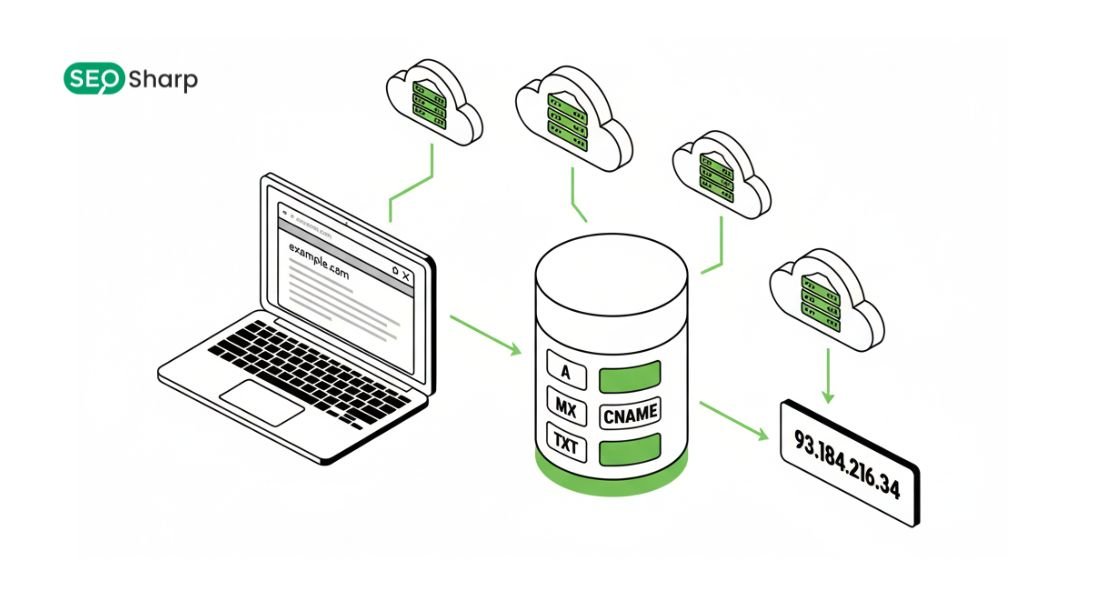
Understanding how a DNS lookup works is essential for anyone running websites managing servers or troubleshooting internet connectivity issues. The Domain Name System (DNS) acts like the internet’s phonebook translating human friendly domain names like example.com into machine readable IP addresses that computers and servers use to communicate.
This translation process happens behind the scenes every time someone loads a webpage, sends an email or connects to an online service. Learning the DNS lookup flow especially with a labelled diagram helps you visualize how data moves across DNS servers and reveals where delays and configuration errors can occur.
A well optimized DNS not only speeds up your website but also enhances reliability, security and user experience which is exactly what you’ll learn in this guide.
What Is DNS and Why Is It Important?
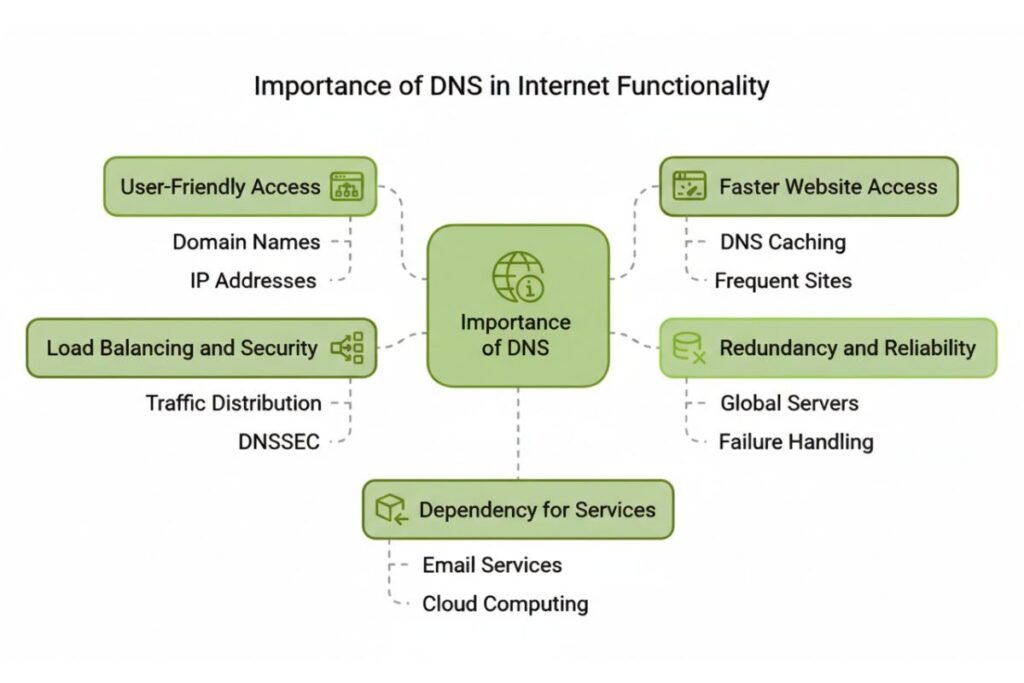
The Domain Name System (DNS) is the backbone of the internet that allows devices to communicate using human readable names instead of numeric IP addresses. Imagine trying to remember a long series of numbers like 192.0.2.1 or 2606:4700:4700::1111 every time you want to visit a website it would be nearly impossible at scale.
DNS solves this problem by acting as a hierarchical network of servers that efficiently translates domain names into IP addresses. DNS provides several critical benefits for the internet ecosystem. First it delivers scalability by distributing query handling across millions of servers worldwide ensuring millions of users can access websites simultaneously without delay.
Second it ensures redundancy so if one server goes offline others can handle requests preventing downtime. Third DNS improves performance through caching at multiple levels reducing the time it takes to resolve a domain.
Because DNS supports web browsing, email application communication and API interactions even minor misconfigurations or delays can cause slow page loads, failed connections or security vulnerabilities.
Understanding DNS is therefore essential for website owners, IT professionals and anyone looking to improve online reliability speed and user experience.
DNS Lookup Flow: Step-by-Step Diagram and Explanation!
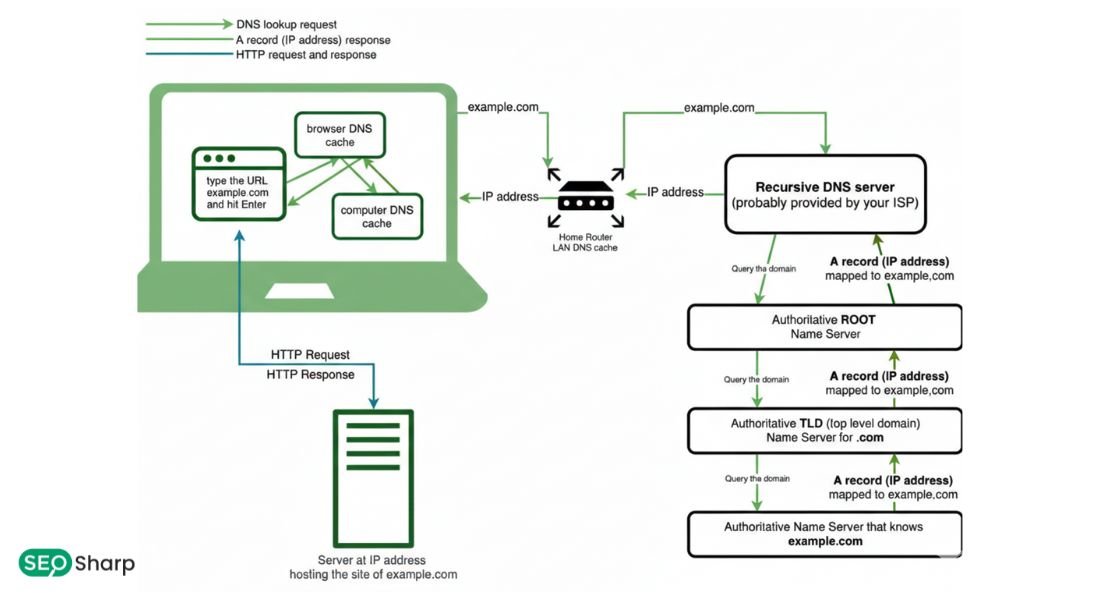
A DNS lookup Flow diagram labelled can be visualized as a carefully coordinated sequence of steps that takes a domain query from your device to the server that knows the answer. This flow begins when a client device initiates a query and concludes when the corresponding IP address is returned.
Using a labelled diagram this flow is often illustrated with arrows showing movement from the client to the recursive resolver then to root servers followed by the top-level domain (TLD) servers and finally to the authoritative name server.
Each step represents a handoff in responsibility showing how DNS servers work together to locate the precise IP address associated with a domain.
This visual flow helps identify potential bottlenecks, optimize caching and troubleshoot errors making it an essential tool for web administrators and IT specialists.
Client Query Initiation
The DNS lookup process begins the moment your device sends a domain query, which is the first step shown in a DNS Lookup Flow Diagram Labelled. Typically, this occurs when you type a URL into a browser or when an application requests a resource from a server.
Your operating system’s stub resolver immediately picks up this query and forwards it to a recursive resolver, which is usually provided automatically by your internet service provider (ISP) or set manually in your network settings.
This step is crucial because it translates user actions like entering a website into the first technical signal that initiates communication with the DNS infrastructure, exactly as illustrated in a DNS Lookup Flow Diagram Labelled. Without this initial query, no further resolution or connection to the desired server can occur.
Recursive Resolver Cache Check
Once the recursive resolver receives your query, it first checks its local cache, a step clearly represented in a DNS Lookup Flow Diagram Labelled. If the resolver has recently processed the same domain and the associated TTL (Time To Live) value has not expired, it can immediately return the cached IP address.
This drastically reduces the time required to resolve a domain, often completing the lookup in just a few milliseconds.
Caching not only speeds up response times for end users but also reduces network load because fewer external queries need to traverse the internet. Resolver cache hits are one of the primary reasons why many websites load almost instantly for returning visitors, a performance benefit that becomes easier to understand when viewed through a DNS Lookup Flow Diagram Labelled.
Root and TLD Lookup
If the recursive resolver does not have the answer in its cache, it contacts one of the internet’s root servers, a step clearly shown in a DNS Lookup Flow Diagram Labelled. Root servers act as the top-level guideposts, knowing where to direct queries for all top-level domains such as .com, .org or .net.
The root server responds with the address of the appropriate TLD server. The resolver then queries the TLD server to find the authoritative name server responsible for the specific domain, continuing the path illustrated in a DNS Lookup Flow Diagram Labelled.
This hierarchical process ensures that queries are efficiently routed and distributed, maintaining DNS reliability even under heavy internet traffic. The structure prevents a single point of failure and allows the DNS system to scale globally, which is why this stage is a core part of every DNS Lookup Flow Diagram Labelled.
Authoritative Server Query
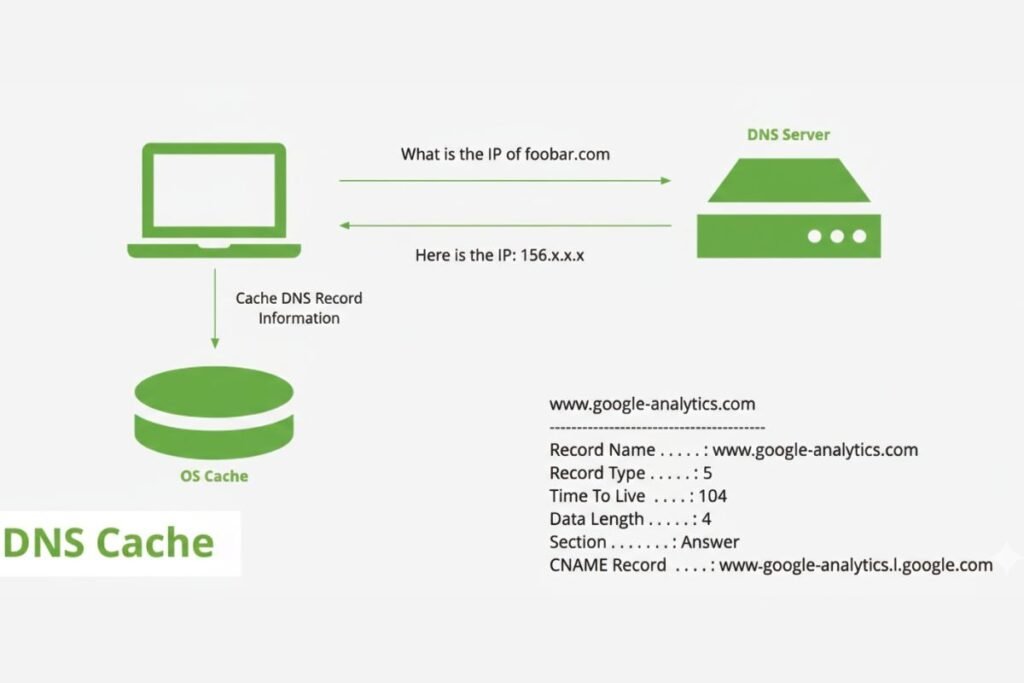
Once the resolver reaches the authoritative server it requests the actual DNS record for the domain. This could be an A record (IPv4) an AAAA record (IPv6) or other record types depending on the service needed.
The authoritative server responds with precise information including TTL values that dictate how long the result should be cached by the resolver and client.
This step ensures that the DNS lookup provides accurate up-to-date information allowing your device to connect to the correct server for web browsing email or any online service.
Caching and Response
After receiving the response from the authoritative server, the recursive resolver caches the result according to its TTL. The resolver then returns the IP address to your device. Your device uses this IP to establish a connection to the destination server, completing the DNS Lookup Flow Diagram Labelled process.
Caching at this stage optimizes subsequent requests for the same domain, improving speed and reducing the overall load on the DNS infrastructure. This cycle of caching and querying is what enables the internet to scale efficiently and is clearly observable when testing resolution behavior using tools like PowerShell resolve commands or online DNS lookup platforms.
What Are the Steps in the DNS Lookup Process?
The DNS lookup process follows a structured series of steps, forming a clear DNS Lookup Flow Diagram Labelled for visualization:
- Your device’s stub resolver sends a domain query to a recursive resolver.
- The recursive resolver first checks its cache.
- On a cache miss it queries a root server for the relevant TLD server.
- The root server responds with the TLD server’s address.
- The recursive resolver asks the TLD server for the authoritative server.
- The authoritative server returns the DNS record like an A or AAAA record.
- The resolver caches the result and replies to the client.
Each step is carefully designed to provide fast accurate and reliable domain resolution ensuring users connect seamlessly to the desired online resources.
What Is the Basic Flow of DNS?
The basic flow of DNS is designed to provide fast, reliable, and efficient domain name resolution. When a client’s stub resolver sends a query, the recursive resolver first checks its cache for a stored response. If no answer is found, it contacts a root server which directs the resolver to the appropriate top-level domain (TLD) server for the domain extension.
Next, the resolver queries the TLD server to locate the authoritative name server responsible for the specific domain. Finally, the resolver contacts the authoritative server, retrieves the correct IP address, caches it for future requests, and returns it to the client. This systematic process ensures that DNS queries are resolved quickly, reduces latency, and minimizes network congestion.
Visualizing this step-by-step process in a DNS Lookup Flow Diagram Labelled helps beginners and professionals alike understand how queries travel across different servers, why delays can happen and where optimizations can improve speed and reliability across the internet.
What Happens During a DNS Lookup?
During a DNS lookup your device initiates a largely invisible but critical process. The stub resolver sends a domain query to a recursive resolver which checks its cache.
If the answer is unavailable the resolver queries a root server which directs it to the correct TLD server. The resolver then asks the TLD server for the authoritative server of the domain.
The authoritative server responds with the IP address which the resolver caches and returns to your device. Your device then uses this IP to connect to the server completing the lookup and allowing seamless web access.
Improving Performance and Privacy
Modern DNS systems incorporate several features to enhance both speed and privacy. DNS prefetching allows browsers to resolve domain names in advance reducing page load times.
This is particularly useful for websites that rely on multiple external resources such as content delivery networks analytics or advertisements. Advanced caching strategies improve efficiency even further.
Resolver-level caching handles a significant portion of queries locally without external lookups. Operating systems maintain local DNS caches that can be inspected or cleared when needed.
Selecting appropriate TTL values balances record freshness with performance ensuring optimal browsing experiences.
Encrypted DNS and DNSSEC Best Practices
Security and privacy are critical aspects of DNS, and understanding them is easier when you visualize the process in a DNS Lookup Flow Diagram Labelled. Encrypted DNS protocols, such as DNS-over-HTTPS (DoH) or DNS-over-TLS (DoT), protect your DNS queries from interception, eavesdropping or tracking by unauthorized parties.
Meanwhile, DNSSEC adds cryptographic signatures to DNS records, ensuring that the responses you receive are authentic and have not been tampered with.
Regular verification of DNS behavior, including leak tests and monitoring resolver responses helps confirm that your queries remain secure and private. Following these best practices not only prevents attacks like cache poisoning and spoofing but also strengthens trust in your DNS infrastructure and improves overall internet reliability.
Changing DNS Settings on Android for Better Security and Speed
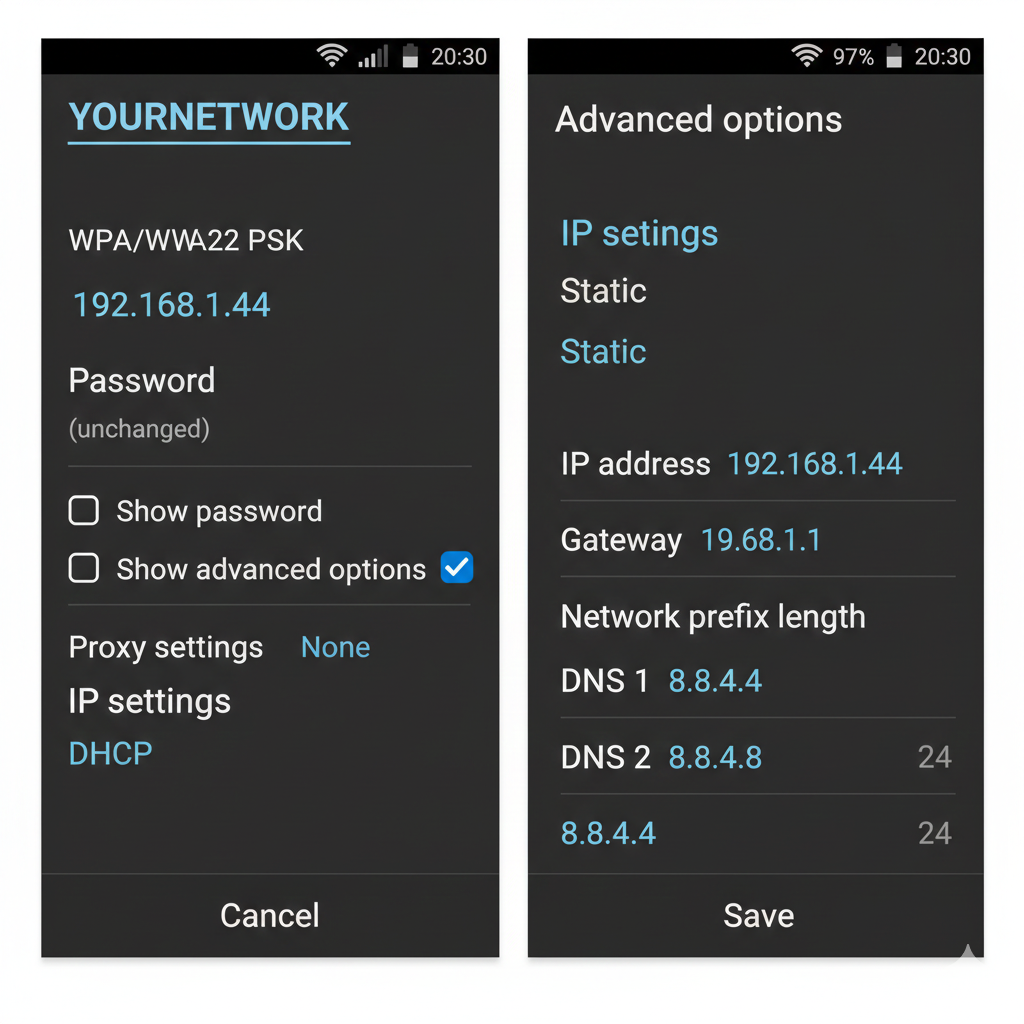
Mobile users can significantly enhance both DNS performance and privacy by adjusting DNS settings on their Android devices. These settings can be modified easily through the system menus or by using trusted DNS management apps from the Play Store making it accessible even to non-technical users.
Choosing high performance DNS providers, such as Google DNS (8.8.8.8) or Cloudflare (1.1.1.1), helps block access to malicious domains, reduces unwanted tracking and speeds up DNS resolution.
When combined with a clear understanding of how DNS queries flow visualized in a DNS Lookup Flow Diagram Labelled users can see how their settings affect query resolution and ensure that their device connects efficiently to the intended servers.
These adjustments not only improve mobile network security but also enhance browsing and app performance, providing a faster, safer, and more reliable online experience without needing advanced technical knowledge.
Conclusion: Mastering DNS Lookup for Performance and Reliability!
The DNS lookup process is one of the most fundamental yet often overlooked components of internet architecture. By combining hierarchical delegation caching strategies and security practices such as encrypted DNS and DNSSEC DNS ensures that domain names resolve quickly and securely.
A DNS lookup flow diagram labelled helps visualize this journey from client query to authoritative answer clarifying complex interactions and revealing opportunities for optimization.
Using SEOSharp’s DNS Lookup tool you can analyze, monitor and optimize DNS resolution for your domains to improve performance and user experience.
How often do DNS records update globally?
DNS updates propagate according to the configured TTL values. Full global propagation can take up to 48 hours depending on resolver caches and geographic routing.
Can DNS affect website loading speed?
Yes, DNS resolution is one of the first steps in page loading. Poorly configured or slow DNS servers can add significant delay before a website begins loading content.
Why do some sites use multiple A records?
Multiple A (or AAAA) records enable load distribution across servers or geographic locations improving redundancy and reducing server overload.
What is the difference between A and AAAA records?
An A record maps a domain to an IPv4 address while a AAAA record maps a domain to an IPv6 address. IPv6 addresses provide larger capacity for the internet.
How can I test if my DNS settings are secure?
Use diagnostic tools to run DNS leak tests and verify encrypted DNS behavior. Ensuring DNSSEC validation enhances security and privacy.