
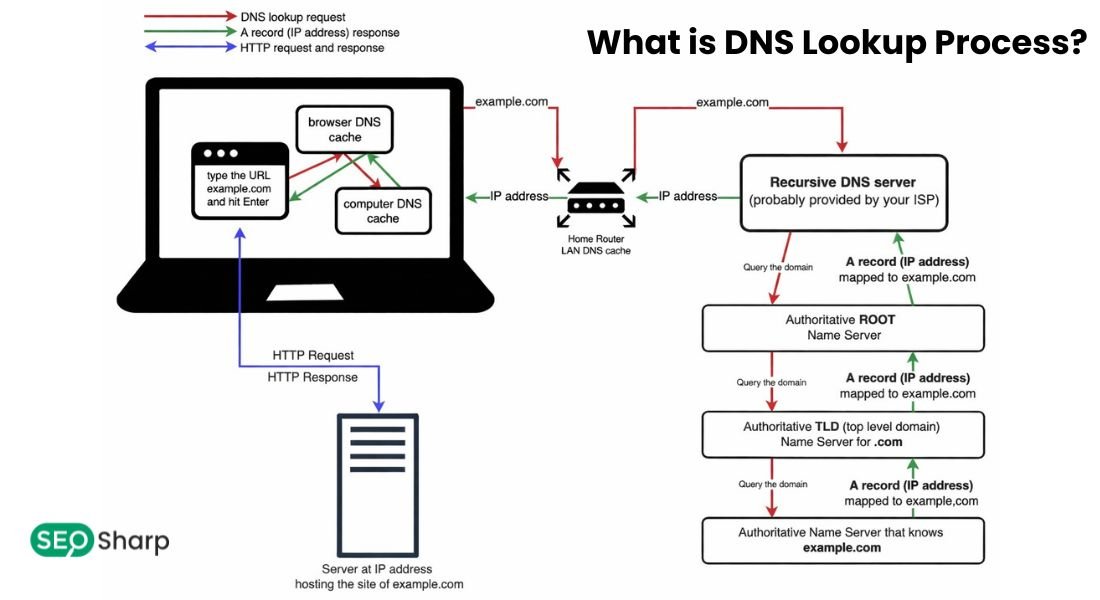
DNS Lookup is the process of translating human-readable domain names like example.com into numerical IP addresses that computers use to communicate over the internet. It ensures that websites, email servers and other online services are reachable and functioning correctly by querying authoritative DNS servers for accurate records.
Understanding DNS Lookup is crucial for anyone managing a domain or network as it allows users to verify configurations, detect issues and maintain smooth connectivity while our DNS Lookup tool provides a quick reliable way to access this information instantly.
How Does DNS Lookup Work?
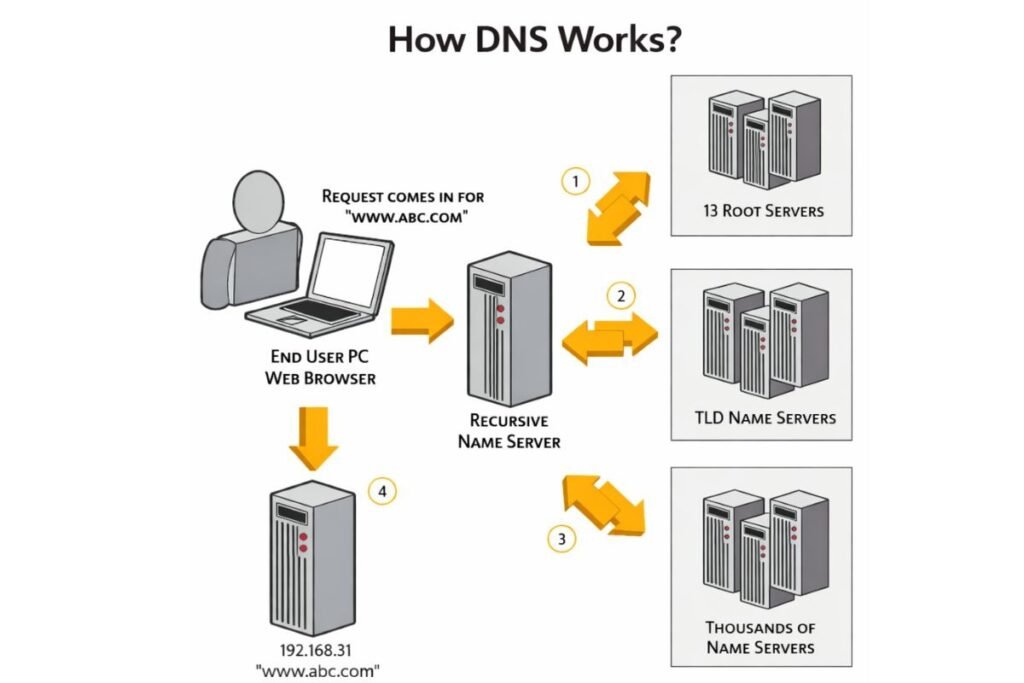
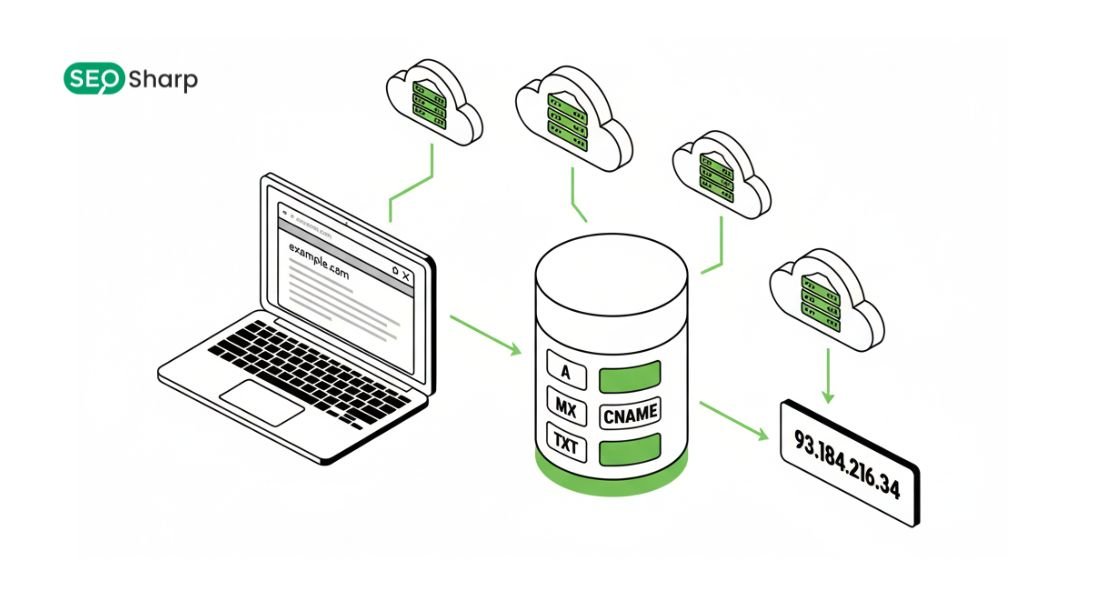
DNS Lookup is the process of querying Domain Name System servers to obtain information about a domain’s IP address or other DNS records. Functioning as the internet’s phonebook it maps domain names to IP addresses ensuring seamless communication between devices.
There are two main types of DNS Lookup. Forward DNS Lookup converts a domain name into its corresponding IP address so for example www.example.com may resolve to 192.168.1.1.
In contrast Reverse DNS Lookup converts an IP address back to its associated domain name which is commonly used in email verification and security checks. The standard DNS resolution process involves several steps that usually complete within milliseconds.
First the device checks its local DNS cache to see if a recent copy of the domain’s record exists. If not the query is sent to a recursive resolver typically provided by your ISP or a public DNS server.
The recursive resolver then contacts a root nameserver to locate the appropriate top-level domain (TLD) server. The TLD server in turn directs the query to the authoritative nameserver for the domain which responds with the requested DNS record.
The resolver caches this response and delivers it to the user’s device enabling fast and reliable access to websites and online services.
Understanding DNS Records
DNS records are the foundation of how a domain operates on the internet with each record type serving a distinct function to ensure smooth communication. An A Record maps a domain to an IPv4 address while an AAAA Record maps it to an IPv6 address.
A CNAME Record creates an alias pointing one domain or subdomain to another and an MX Record specifies the mail servers responsible for receiving emails.
NS Records identify authoritative nameservers and PTR Records support reverse DNS lookups linking IP addresses back to domain names. The SOA Record contains administrative information about the domain such as the primary nameserver and contact email.
TXT Records store arbitrary text often used for SPF DKIM or DMARC email security while CAA Records restrict which certificate authorities can issue SSL/TLS certificates for the domain. Advanced records like DS and DNSKEY are part of DNSSEC validating records to ensure authenticity and prevent tampering.
Understanding these records is crucial not only for troubleshooting connectivity issues but also for improving security and configuring services accurately across networks.
Common DNS Lookup Tools
There are multiple ways to perform a DNS Lookup using either online platforms or command line utilities depending on the user’s expertise and requirements. On Windows systems the nslookup tool allows users to query DNS records directly from the command line.
For Linux environments commands such as dig or host provide detailed DNS information while PowerShell DNS Lookup offers a more advanced and programmable approach for Windows administrators.
Developers and network engineers can also use Python DNS Lookup through libraries like socket and dnspython to automate queries or integrate DNS checks into scripts.
Additionally services like Cloudflare DNS Lookup enable users to check domain records via public servers to verify propagation and accuracy. These tools empower administrators, developers and even casual users to verify DNS configurations, identify errors and optimize the performance and reliability of their domains.
Types of DNS Lookup
DNS Lookup primarily occurs in two forms: forward and reverse, each serving distinct purposes in network communication. Forward DNS Lookup is the most common type where a domain name is translated into its corresponding IP address allowing users to access websites or services seamlessly.
This process is critical for everyday internet use because without it domain names like example.com would be meaningless to devices attempting to communicate over the internet.
On the other hand Reverse DNS Lookup serves a security and verification function converting an IP address back into its associated domain name.
This is especially important for email servers and network security systems to verify sender authenticity and prevent spoofing or malicious activities.
Together these types of DNS Lookup ensure that users systems and servers can efficiently exchange information while maintaining security and reliability across networks.
Why is DNS Lookup Important?
It plays a pivotal role in ensuring the smooth functioning of online services and digital communications. By accurately mapping domain names to IP addresses it allows computers and devices to locate websites, cloud services and email servers effortlessly.
In addition to basic connectivity DNS Lookup helps administrators manage network resources efficiently monitor domain health and troubleshoot issues before they affect end users.
Accurate DNS configurations also support email deliverability ensuring messages reach the intended recipients through properly configured MX records.
Beyond these operational benefits this Lookup strengthens security by enabling mechanisms like SPF DKIM and DMARC checks which authenticate email senders and reduce spam or phishing risks.
For businesses and individuals alike performing timely DNS Lookups is essential to maintain accessibility, reliability and protection across all internet-facing services.
Troubleshooting DNS Issues
Despite its critical role DNS can occasionally encounter issues that affect connectivity and system performance. Common problems include slow response times, misconfigured records propagation delays or failures to resolve domain names often indicated by errors such as DNS Lookup Failed.
Troubleshooting starts by verifying the domain’s records using reliable DNS Lookup tools and checking the TTL (time-to-live) values to understand caching behavior.
Administrators may also query authoritative nameservers directly to identify discrepancies or misconfigurations in A MX CNAME or other essential records.
Reverse lookups can confirm whether an IP maps correctly to its domain while forward lookups ensure that users and services can reliably reach the intended destinations.
By systematically identifying and correcting DNS-related issues network teams can restore proper functionality, improve access speeds and enhance overall security and reliability of web services.
Advanced DNS Lookup Types and Commands
Beyond standard forward and reverse lookups DNS offers specialized query types for precise domain management. DNS TXT Lookup retrieves text records like SPF DKIM and DMARC essential for email validation and security. DNS SRV Lookup identifies specific services such as VoIP or chat servers enabling applications to connect to the correct endpoints.
Command-line tools enhance these lookups: Windows DNS Lookup with nslookup handles basic and advanced queries PowerShell DNS Lookup automates tasks and Linux users can use dig or host for detailed information.
Developers often use Python DNS Lookup with libraries like socket or dns python for automated checks and analytics. Public DNS tools such as Cloudflare DNS Lookup help verify global record propagation and detect caching issues or misconfigurations.
Using these advanced lookups and tools allows administrators, developers and users to efficiently monitor domain troubleshoot issues and ensure smooth and secure online operations.
Common DNS Lookup Issues and Troubleshooting
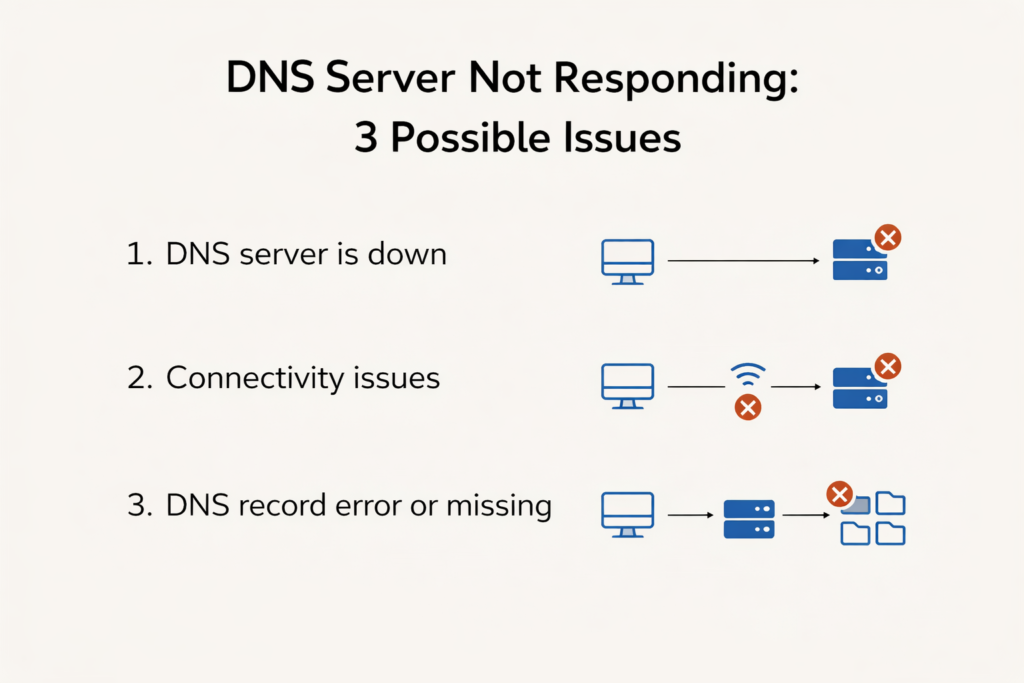
DNS Lookup can sometimes fail or slow down even with correct configurations. A common issue is a DNS Lookup Failed error often caused by misconfigured records server unavailability or network problems.
Slow DNS can result from high latency overloaded servers or caching delays. Tools like the DNS Resolve Command help administrators identify the root cause and fix misconfigurations.
Network-specific factors can also contribute. Cisco devices may require disabling DNS Lookup to prevent unnecessary delays while inconsistencies between authoritative and caching servers can produce outdated responses.
For reverse lookups especially in email systems IPv6 Reverse DNS Lookup or PTR record validation ensures IP addresses correctly map to domain names improving deliverability and reducing spam.
Understanding these issues and applying systematic troubleshooting ensures reliable website email and network operations.
DNS Lookup Security and Best Practices
Securing DNS records is vital for reliable online services and protection against cyber threats. Misconfigured or outdated records can expose domains to spoofing, phishing or other attacks making regular monitoring essential.
Tools like DNS TXT Lookup verify SPF DKIM and DMARC settings to authenticate email senders while validating CAA records ensures only approved certificate authorities can issue SSL/TLS certificates.
Best practices also include monitoring DNS performance to prevent downtime or slow resolutions. Querying multiple public servers such as with Cloudflare DNS Lookup confirms global propagation and detects caching inconsistencies.
Advanced lookups like DNS SRV Lookup map services such as VoIP or messaging correctly ensure clients connect to the right servers.
Regular audits using Linux or Windows DNS Lookup and automation with Python DNS Lookup scripts help identify misconfigurations early and maintain network resilience. Combining proper record management monitoring and validation keeps domains secure, performant and reliable.
DNS Lookup Use Cases and Applications
It is vital for translating domain names into IP addresses enabling seamless access to websites, email servers and cloud services. For businesses MX records ensure correct email delivery while Reverse DNS Lookup Command verifies sender authenticity.
DNS SRV Lookup helps locate services like VoIP chat platforms or internal apps automatically reducing manual errors. In cloud setups DNS ensures APIs and distributed services communicate efficiently.
Even casual users benefit from forward and reverse lookups improving connectivity browser performance and domain insights. IT professionals use Lookup to troubleshoot slow resolutions, validate propagation and detect misconfigurations.
Tools like PowerShell DNS Lookup Linux Lookup DNS and Python DNS Lookup scripts enable precise queries and automated monitoring.
Cloudflare DNS Lookup ensures global visibility of changes. Understanding these applications helps optimize performance, strengthen security and maintain smooth online experiences.
Troubleshooting Common DNS Lookup Issues
It can occasionally fail or return unexpected results causing disruptions in website access, email delivery or application connectivity.
One common problem is when the lookup process returns no response or “Lookup Failed.” This can happen due to incorrect DNS server configuration, expired records or network connectivity issues.
Another frequent issue is slow DNS resolution which can result from overburdened recursive resolvers network latency or misconfigured caching policies. Users may also encounter errors if TTL (Time to Live) values are too high causing outdated records to persist longer than intended.
Tools like Windows DNS Lookup, Linux dig commands or Python DNS Lookup scripts allow administrators to systematically identify the source of the problem, validate authoritative responses and verify record propagation across global servers.
By understanding these common issues and the ways to diagnose them users can maintain reliable connectivity, prevent service interruptions and ensure efficient domain management.
How to Fix Slow DNS Lookup?
Slow DNS lookups can affect website performance, email delivery and overall user experience. To improve speed administrators check recursive resolvers and authoritative nameservers switch to public DNS servers like Google or Cloudflare and optimize caching policies with appropriate TTL values.
Proper network configuration minimizing redundant queries and monitoring bottlenecks also help. Tools like PowerShell DNS Lookup and Linux dig provide detailed insights into query times enabling precise troubleshooting and faster resolution.
DNS Lookup Flow Diagram / Process
DNS Lookup follows a structured flow to resolve domain names to IP addresses. The user device first checks its local cache then queries a recursive resolver which contacts the root nameserver and TLD server before reaching the authoritative nameserver.
Each step often shown in a DNS Lookup Flow Diagram highlights DNS’s hierarchical and recursive nature. Understanding this process helps administrators and developers troubleshoot issues optimize performance and maintain seamless connectivity.
IPv6 Reverse DNS Lookup
IPv6 Reverse DNS Lookup converts an IPv6 address to its domain name using PTR records which is vital for email verification, spam prevention and accurate IP-to-domain mapping.
Modern tools including Linux dig and Python DNS Lookup support IPv6 queries allowing administrators to validate addresses, detect misconfigurations and ensure proper resolution.
Mastering IPv6 reverse lookups ensures compliance and uninterrupted connectivity in modern networks.
Forward and Reverse Lookup Zones
DNS zones are key to domain management. Forward lookup zones map domain names to IP addresses for user access while reverse lookup zones link IPs back to domain names for email verification diagnostics and security monitoring.
Correctly configuring these zones prevents misrouting and ensures smooth communication. Tools like Windows DNS Lookup cloud DNS services and Python DNS Lookup scripts help administrators validate records, check configurations and identify conflicts efficiently.
Security & Best Practices
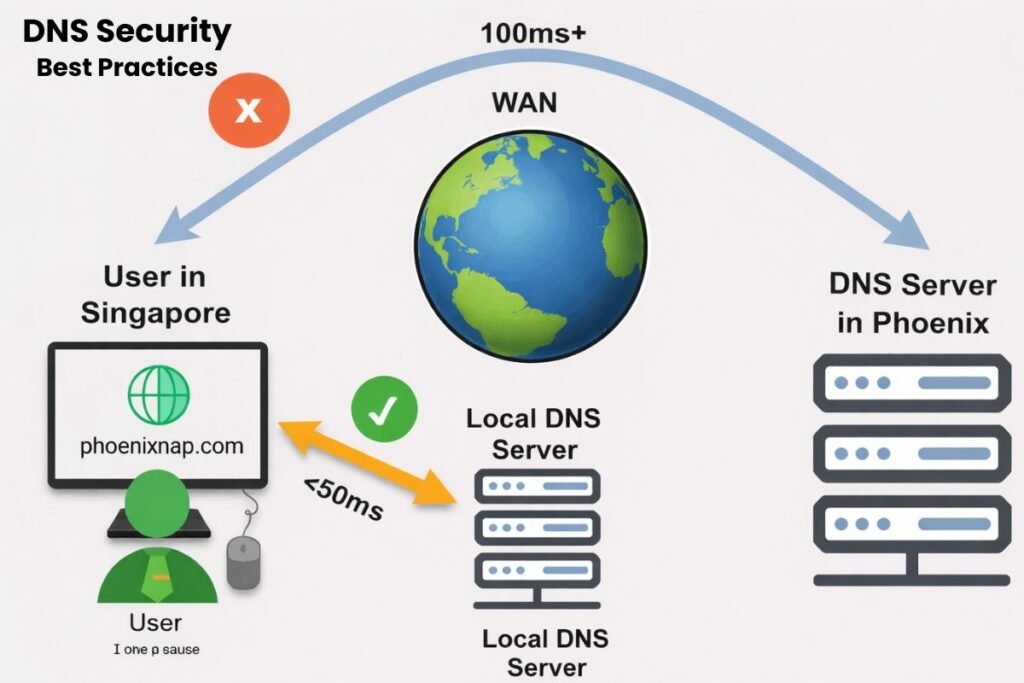
Security is a critical consideration in DNS management. Properly configured DNS records prevent spoofing, phishing and unauthorized access to network resources.
Implementing SPF DKIM and DMARC records verifying CAA policies and ensuring secure DNS servers are foundational steps in protecting domain integrity.
Regular monitoring using tools such as Cloudflare DNS Lookup and reverse DNS checks enables administrators to identify anomalies or potential attacks early.
Additionally, following best practices in record management avoiding excessive TTL values and routinely auditing authoritative nameservers ensures robust, reliable and secure DNS infrastructure.
Maintaining awareness of emerging threats especially with IPv6 adoption helps organizations stay ahead in protecting their online services and data.
Conclusion:
It remains one of the most critical processes in modern networking bridging human readable domain names with machine readable IP addresses.
By understanding how lookups work, mastering forward and reverse zones, troubleshooting common issues and leveraging advanced query types administrators and users can ensure seamless connectivity, reliable email delivery and secure online operations.
Integrating best practices in DNS management including IPv6 readiness and proper record configuration enhances both performance and security.
At Seosharp we provide an easy to use DNS Lookup tool that allows you to quickly check domain records, validate configurations and monitor your network’s health.
FAQs
What is the difference between recursive and iterative DNS queries?
A recursive query requires the DNS server to provide a complete answer to the client even if it must query other servers. An iterative query only returns the best answer the server can provide and the client may need to query additional servers. Understanding this distinction helps in troubleshooting slow DNS lookups.
How does DNS caching impact website load times?
DNS caching stores resolved IP addresses temporarily on devices and servers. Cached results reduce lookup times, speeding up website access. However outdated cache entries can sometimes cause errors if the domain’s records change frequently.
Can DNS Lookup reveal website hosting locations?
Yes, by checking A or AAAA records and using reverse DNS lookups users can often identify the IP ranges and hosting providers of a website which is useful for network planning and security assessments.
Why do some domains have multiple DNS records?
Multiple DNS records provide redundancy load balancing or service-specific routing. For example having several A records allows traffic to be distributed across multiple servers enhancing availability and reliability.
What are common causes of DNS propagation delays?
Propagation delays occur when DNS record changes take time to update across all global DNS servers. High TTL values, slow ISPs and caching policies can all extend propagation time causing temporary discrepancies when accessing a domain from different locations.
How can I test if my DNS server is secure?
You can test for vulnerabilities like open recursion cache poisoning or misconfigured records using specialized DNS testing tools. Ensuring proper firewall settings DNSSEC and authoritative server security protects your network from attacks.
What is split-horizon DNS and why is it used?
Split-horizon DNS serves different DNS responses depending on whether a client is inside or outside a network. This is commonly used in enterprises to keep internal IP addresses private while exposing public services to the internet.
How does DNS affect email deliverability?
Incorrect DNS records like MX SPF DKIM or DMARC can cause emails to be rejected or marked as spam. Verifying these records using DNS lookup tools ensures email systems function reliably.
Do some websites load intermittently due to DNS?
Intermittent access is often caused by DNS server downtime, inconsistent caching or network routing issues. Monitoring DNS resolution times and server health can prevent such disruptions
Can DNS Lookup detect phishing or malicious domains?
Yes, checking DNS records can reveal suspicious configurations, mismatched IP addresses or unusual domain aliases that may indicate phishing attempts. Security teams often use DNS analysis as part of threat intelligence.


2 Responses
I found the explanation of forward vs. reverse DNS lookups really insightful. It’s easy to forget the significance of reverse lookups, especially in security contexts like email verification, so this was a great reminder.
Thank you! We’re glad you found it helpful. You’re right, reverse DNS is often overlooked but essential for email security and verification.
Feel free to try our free DNS Lookup tool at Seosharp anytime to validate your records quickly.